

If you’re sending invites for prospecting, hiring, fundraising, or personal branding, you’ve probably run into the weekly invitation limit at least once.
This guide explains the current state of LinkedIn invitation limits, what’s changed, why people are hitting restrictions faster than before, and what you can do to keep growing your network without getting blocked.
You’ll also find new real-world problems shared by recruiters, founders, and operators, and practical fixes you can start using immediately.
What Is the LinkedIn Invitation Limit?
The LinkedIn invitation limit is the cap on how many connection requests you can send per week. It’s designed to reduce spam, but in practice, it often restricts legitimate networking, especially for people working in revenue, hiring, or community roles.
LinkedIn doesn’t publish exact numbers, and support representatives won’t disclose them. Still, patterns across tens of thousands of users are consistent.
How Many LinkedIn Invites Can You Send Per Week Today?
Here’s the most accurate range based on user testing, recruiter communities, and SaaS teams who manage LinkedIn at scale:
Account Type
Expected Weekly Invite Limit
New accounts
20–40 invites/week
Normal accounts
60–100 invites/week
High engagement accounts
80–120 invites/week
Accounts near 30k connections
May stop resetting entirely
Accounts using personal notes heavily
Often restricted faster
Everything points to ~100 invites per week as the working ceiling.
What Happens When You Hit the Weekly Invite Limit?
If you see the message:
“You’ve reached the weekly invitation limit.”
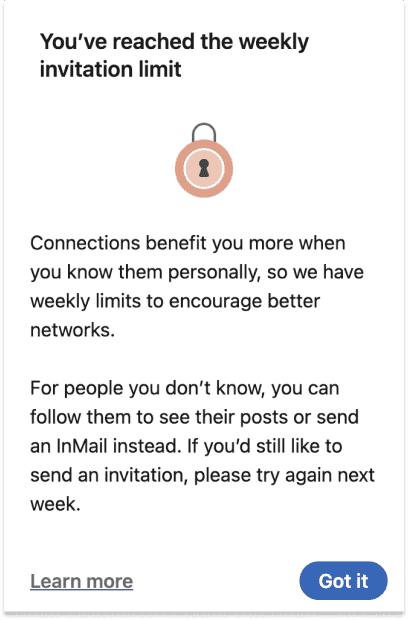
You’re locked out for several days. Sometimes the lock lasts a full week. Trying to force additional invites doesn’t help and can actually extend the cooldown.
What LinkedIn wants you to do:
- Wait for the reset
- Improve acceptance rates
- Reduce pending invitations
What you should do:
Withdraw pending invitations – especially older than 30 days. LinkedIn tracks invitation acceptance rates. Poor ratios = stricter limits.
The New Problems Professionals Are Facing With LinkedIn Limits (And How to Fix Them)
1. Recruiters hitting their limit and unable to send invites
A recent LinkedIn post from a recruiter said:
“A lot of recruiters, like myself, have hit the LinkedIn connection limit and are no longer able to send invites. I like to follow folks for future opportunities, but some people don’t have Follow enabled.”
This is happening more often as recruiters max out weekly invite caps.
The Fix: Turn on “Everyone on LinkedIn” for followers – and use LeadDelta when invites run out.
Here’s the setting LinkedIn users need to check: Settings → Visibility → Followers → Choose Everyone on LinkedIn.
This allows people to follow you without requiring a connection.
LeadDelta Tip: When you hit the limit, simply save the profile using the LeadDelta Sidebar and send the request next week when your quota resets. No notes lost. No spreadsheets. No forgetting who mattered.
2. The limit stops resetting after 30,000 connections (the hard cap)
Once you hit 30,000 connections, something new is happening:
Your weekly invite limit stops resetting.
This is because LinkedIn considers 30k a maximum and wants you to convert new relationships into followers instead of connections.
Many high-volume networkers have discovered that hitting 30k is not a milestone- it’s a bottleneck.
How people are responding
One post captured the sentiment perfectly:
“I’m deleting 10,000+ LinkedIn connections. I hit the 30k limit and realized most of them don’t see my content and I don’t see theirs. The algorithm buries us from each other.”
And yes – bulk removing 10k connections manually is brutal.
LeadDelta Tip: LeadDelta’s bulk management makes this manageable. You can segment your network, filter non-engaging or irrelevant profiles, and remove them efficiently – without destroying your activity feed or losing track of important relationships.
3. The strangest flaw in LinkedIn invitations today:
Unlimited blank requests – but restricted personalized ones
This is one of the biggest frustrations power users face.
A trending post pointed out:
“LinkedIn lets you send unlimited blank connection requests but limits the ones with personal notes.”
This is not only true – it’s backward:
- You can fire off dozens of blank requests without getting blocked.
- But add a personal note? You’ll hit the weekly limit much faster.
From a networking perspective, this makes no sense. Personal notes create context, reduce spam, and improve acceptance rates.
Why LinkedIn does this (realistically)
Blank invitations require fewer data points and are easier to evaluate as “normal intent.” Personalized notes often correlate with outreach tools, which LinkedIn monitors tightly.
What this means for your strategy
- Use notes selectively for high-value prospects.
- For broad networking (events, alumni, shared groups), skip the note.
- Track the people who should get a note inside LeadDelta, where you can tag, segment, and follow up later with a message instead.
LeadDelta Tip: Store your segmented lists in LeadDelta and prioritize thoughtful outreach after the connection request is accepted – bypassing the “note throttling” problem entirely.
Top 3 Alternatives for Inviting Someone to Connect
1. Overcome Linkedin Invitation Limit with Email Invites
Go to: My Network → More options → Sync contacts
LinkedIn will surface matching profiles from your email accounts.
These invitations:
- Are considered “warm” outreach
- Don’t count toward your weekly limit
- Have higher acceptance rates
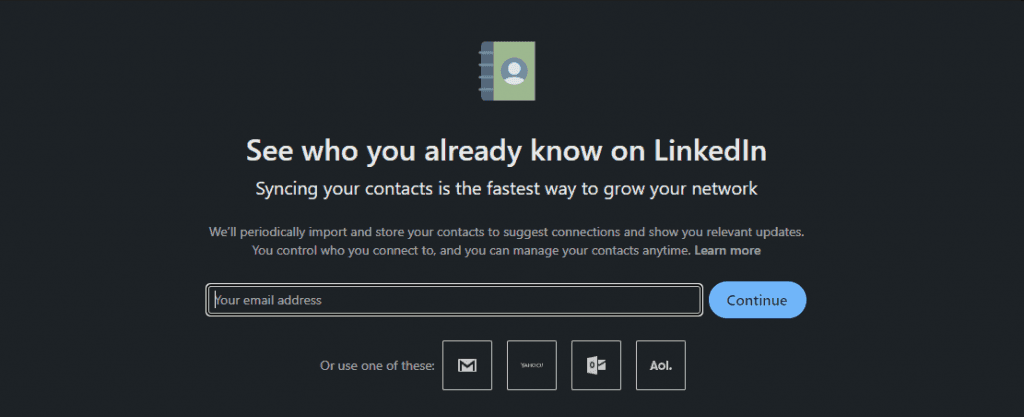
Linkedin will match your email with profiles and offer them to you.
Just tick the ones you want to connect with and hit “Add Connections.”
2. Overcome LinkedIn Invitation Limits with Groups
Another place that the LinkedIn invitation limit doesn’t affect are LinkedIn groups.
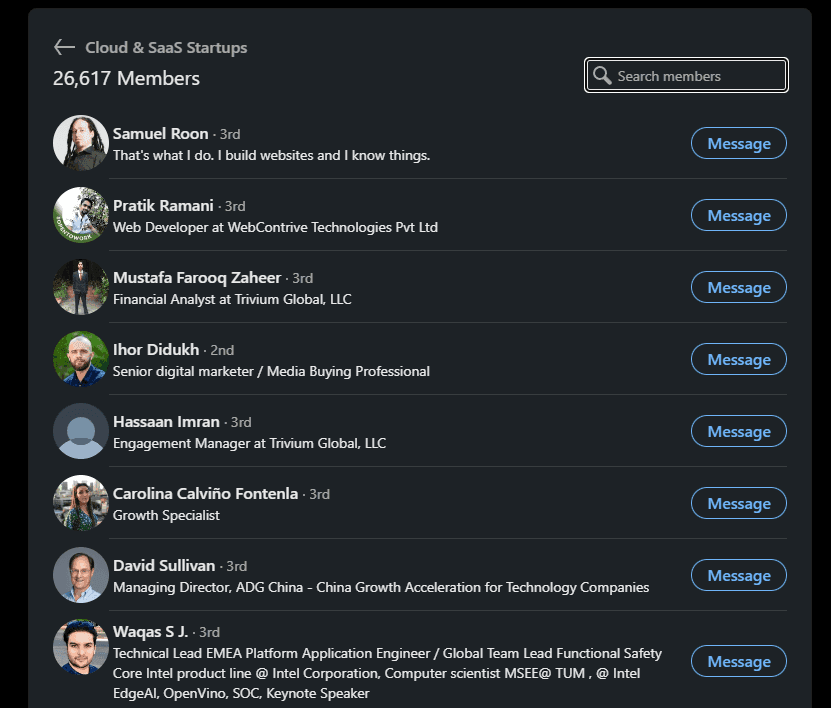
Being part of a LinkedIn group enables you to send direct messages to each member in it without even being connected on LinkedIn.
This means that you can contact 2nd and 3rd-degree connections easily.
Once you enter the group, click “See all” to get an overview of the LinkedIn group members.
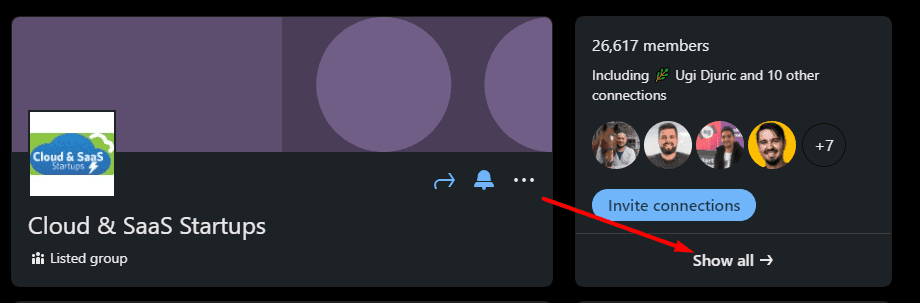
Here, you’ll see a list of LinkedIn group members, so you can message them directly by clicking on the “Message” button next to their names.
3. Overcome LinkedIn Invitation Limits with Events
You can also do it with LinkedIn events.
Once you sign up for a specific event, you can access the list of all the event attendees that you can use to contact them.
To access them, just click the Networking Tab.
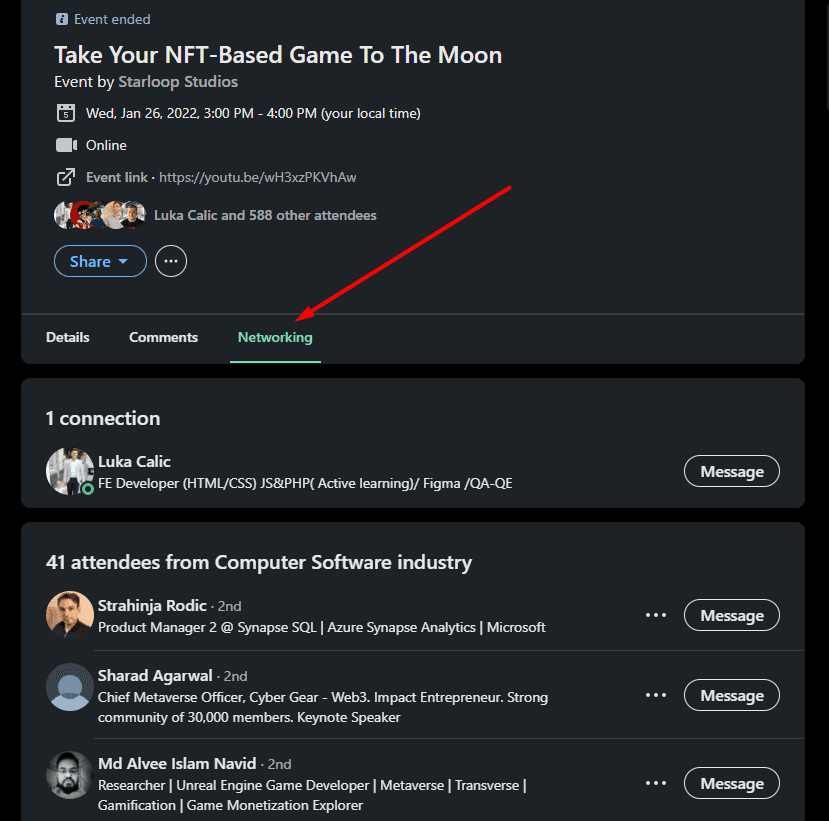
Here you will be able to send a message to any of the event attendees you want.
How LeadDelta Helps You Beat the Practical Limitations LinkedIn Doesn’t Solve
LinkedIn’s design rewards volume, restricts personalization, and limits your visibility. LeadDelta sits on top of LinkedIn and gives you the control LinkedIn doesn’t offer.
Here’s how seasoned operators use it:
1. Save connections when your limit is hit
Instead of forgetting who you planned to reach out to, save them with LeadDelta Sidebar with tags like:
- “Invite next week”
- “High priority”
- “Event attendee”
When the limit resets, everything is queued and ready.
2. Manage your network when you’re close to 30k
Bulk filtering + bulk removal is the only sustainable way to keep a healthy, intentional network.
3. Keep context when you’re forced to send blank invites
Since LinkedIn throttles personalized notes, track your context inside LeadDelta and follow up after they accept.
FAQs
How many LinkedIn invites can I send per week?
Most users land between 60–100 invites per week, depending on account age, activity, and acceptance rates.
Does LinkedIn reset the weekly limit?
Yes- unless you are near the 30,000 connection cap, where resets become inconsistent.
Do personalized notes reduce my weekly limit?
Not officially- but yes, in reality they do. Personalized invites are throttled more aggressively.
Can I send unlimited blank invites?
You can send far more blank requests than personalized ones, but you’ll eventually hit a limit.
What’s the best workaround when I hit my limit?
Save the prospects using the LeadDelta Sidebar, tag them, and send requests next week when your quota resets.
Final Thoughts
LinkedIn’s weekly invitation limit has shifted from an annoyance to a structural constraint on how professionals build relationships. The rules reward speed instead of depth, volume instead of context, and reactive networking instead of intentional growth.
If you want to keep building high-quality connections, without fighting the algorithm, tools like LeadDelta give you control where LinkedIn restricts you. Organize your network, stay visible to the right people, segment intelligently, bulk remove outdated connections, and reconnect with purpose.
Your network is only as valuable as your ability to manage it.

