

AI tools for LinkedIn that work on your network
Most “AI tools for LinkedIn” write your posts or automate your outreach. LeadDelta’s AI does something more useful — it works on the network you already built: finding warm intros, answering questions about your connections, drafting replies in your voice, and plugging into the AI you already use.
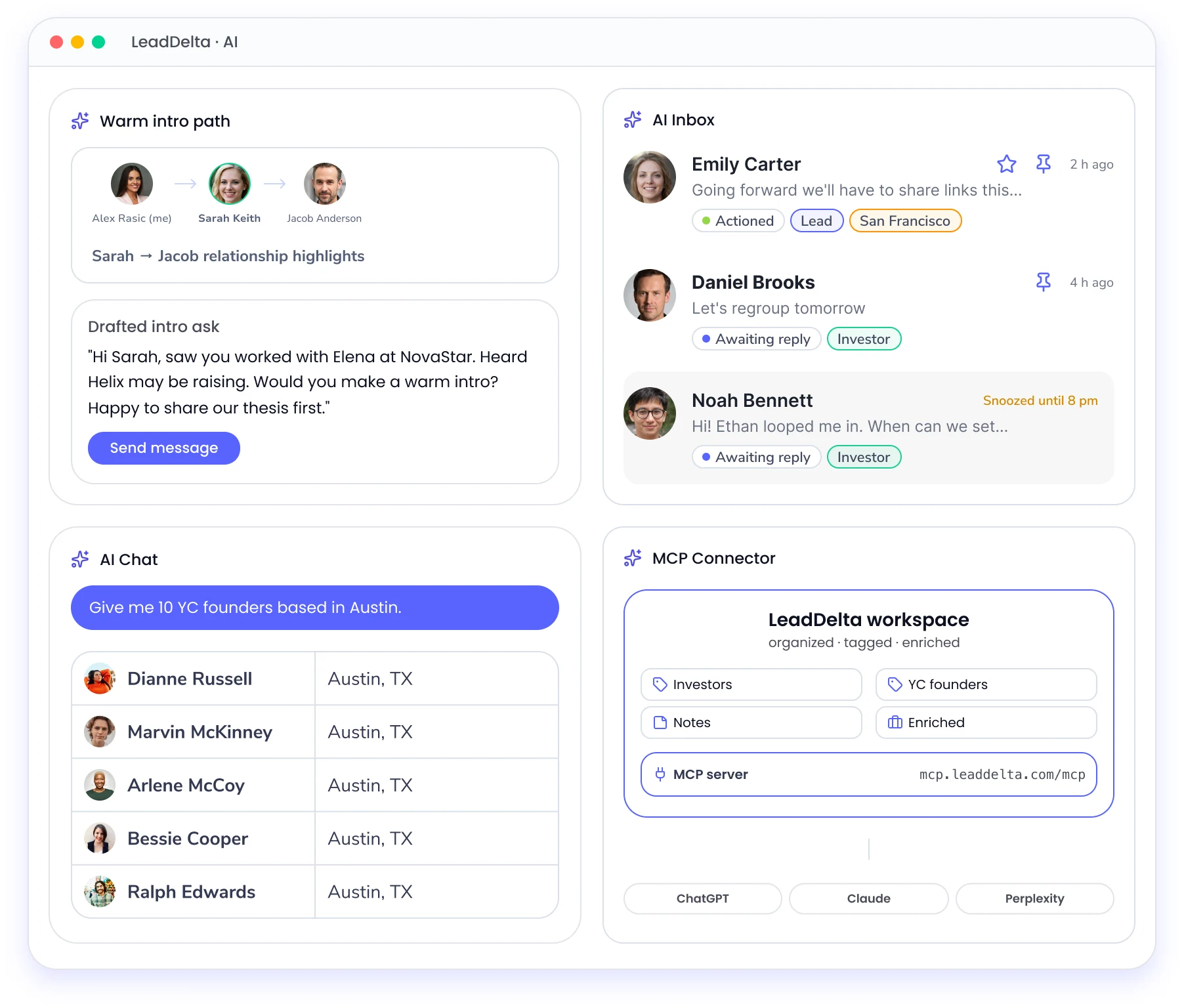
What LeadDelta's relationship AI does
What are AI tools for LinkedIn?
They fall into three camps: tools that write your content, tools that automate your outreach, and LinkedIn’s own built-in AI.
There’s a fourth that barely exists yet — AI that works on your own network. That’s LeadDelta. Instead of generating posts or blasting strangers (which can get your account restricted), it helps you use the relationships you already have.
Get introduced to anyone
Pick a person — a connection, a 2nd-degree, or just a LinkedIn URL you pasted in — and AI finds who can introduce you. It ranks each connector strong, moderate, or weak with a confidence score, explains why (same company, school, city, era), and drafts the ask. Solo or in bulk.
“Warmest path to founder of Helix AI”
 Alex Rasic (me)Sarah Keith
 Jacob Anderson
Sarah → Jacob relationship highlights:
✦ Worked together at PilotHQ from 2021 to 2023.
Drafted intro ask
“Hi Sarah, saw you worked with Elena at NovaStar. Heard Helix may be raising. Would you make a warm intro? Happy to share our thesis first.”
Send messageAsk your network anything
Type a question like you would to ChatGPT — “give me 10 YC founders in my network I should reach out to,” or “who’s that person from Canada at Silicon Valley Bank?” — and AI answers from your connections, your teammates’, and your own notes.
It returns names, roles, how you know them, and a drafted next step, as a list or a table. You message them without leaving LeadDelta.
AI Chat
Give me 10 YC founders based in Austin.
 Dianne RussellAustin, TX
 Marvin McKinneyAustin, TXArlene McCoyAustin, TX
 Bessie CooperAustin, TXRalph EdwardsAustin, TX
Never miss a message and reply in your voice
AI labels every incoming message and sorts your main inbox from the noise. When it’s time to reply, it drafts in your voice — trained on up to two years and 30 messages of your real conversations — and you can refine in a click: change the tone, translate, fix, shorten, or expand.
Main inbox
Emily Carter
2 h agoGoing forward we'll have to share links this…
Daniel Brooks
2 h agoLet's regroup tomorrow
Cody Fisher
4 h agoThat would be amazing! Would 2 pm work?
AI drafted 3 replies — review & send
Use your network in ChatGPT, Claude, or Perplexity
Connect LeadDelta to your favorite AI with the MCP server, and your LinkedIn network becomes something you can query in plain English from ChatGPT, Claude, or Perplexity.
Your LeadDelta network
Connections · tags · notes · messages
MCP server
“Which of my contacts changed jobs into fintech this quarter?”
MCP server endpoint: mcp.leaddelta.com/mcpAI that respects your account.
LeadDelta’s AI never auto-connects, auto-messages, or scrapes — the behaviors that get LinkedIn accounts restricted. It drafts; you send. It surfaces; you decide. The AI does the thinking, you keep the relationship.
- AI drafts, you sendEvery message is reviewed and sent by you — never automated.
- AI surfaces, you decideIntro paths, labels and answers are suggestions, not actions.
- No auto-connect or scrapingThe exact behaviors that get LinkedIn accounts restricted.
Recognized as a leading app

4.6/5


4.5/5

4.8/5

4.8/5
Questions? We’ve got answers.
Everything you need to know before getting started.
It depends what you need — content tools (Taplio, Supergrow) for posts, outreach tools for campaigns, and relationship AI like LeadDelta for working your existing network.
Yes, but pointed at your network rather than at strangers. It finds the warmest intro path to someone and drafts the ask, answers plain-English questions about your connections, labels your inbox and drafts replies in your voice, and exposes your network to ChatGPT, Claude or Perplexity through the MCP server.
It depends entirely on what the AI does. Auto-connecting, auto-messaging and scraping are the behaviours that get accounts restricted — LeadDelta does none of them. Our AI drafts and surfaces; you review and send. The AI does the thinking, you keep the relationship.
It drafts them and you send them. Replies are written in your voice — trained on up to two years and 30 messages of your real conversations — and you can refine any draft in a click: change the tone, translate, fix, shorten, or expand. Nothing sends automatically.
Yes. The LeadDelta MCP server connects your network to ChatGPT, Claude or Perplexity, so you can query your connections, tags, notes and messages in plain English from the AI you already use.

Your network is worth millions.
Let’s unlock it
Join 40,000+ founders, sales teams, and recruiters turning LinkedIn into pipeline.
No credit card required