

The LinkedIn–HubSpot integration that syncs your messages
Push your LinkedIn connections into HubSpot as contacts, lists, workflows, or deals — and log your LinkedIn conversations as activities on the timeline. No copy-paste, no Sales Navigator Advanced Plus.
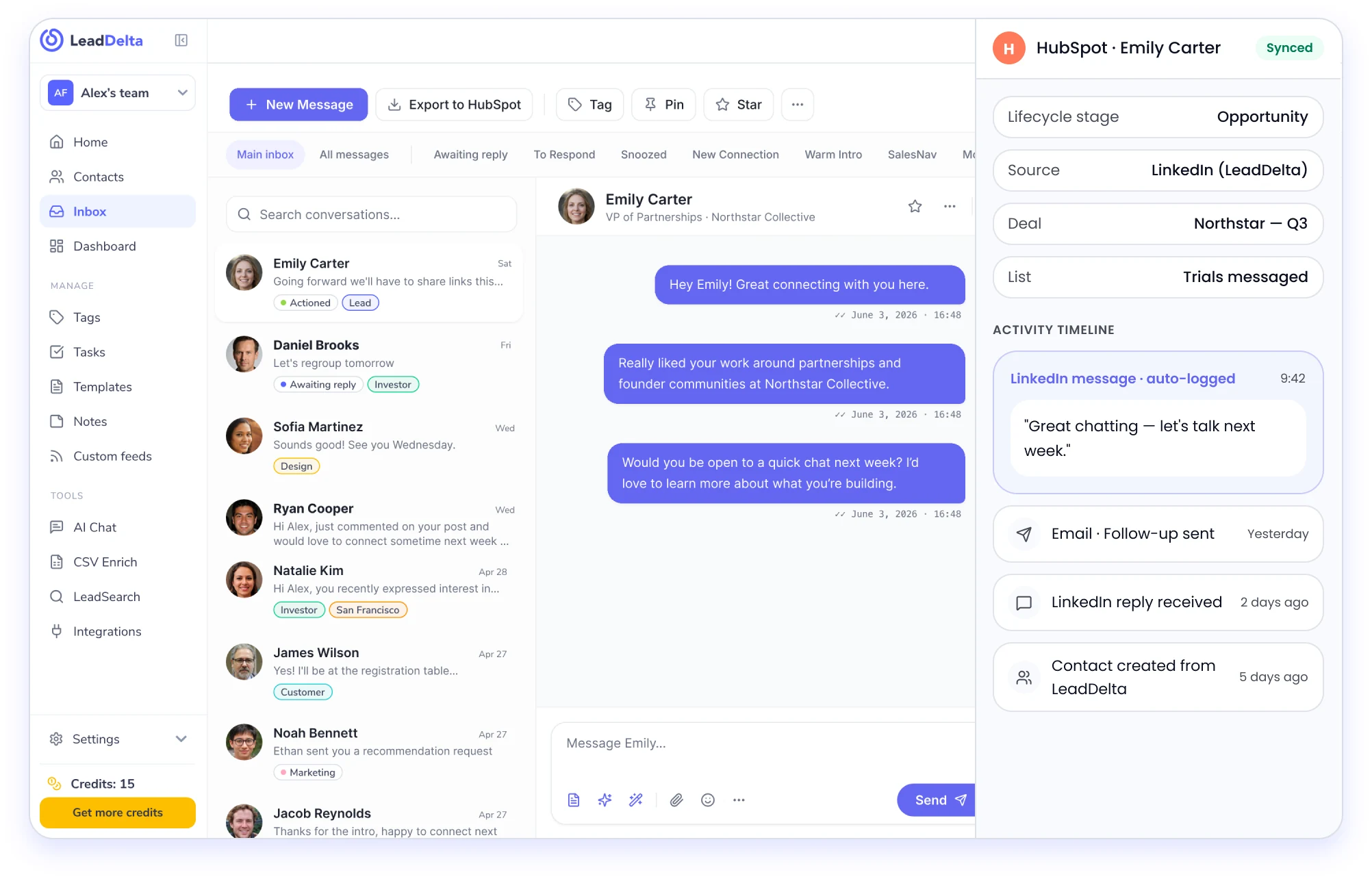
How the LeadDelta HubSpot integration works
Your LinkedIn deals never make it into HubSpot

Emily Carter
Yes, that works — Wednesday at 10?
Awaiting reply
Ryan Cooper
Hi Alex, just commented on your post and…
Awaiting reply
Sofia Martinez
11 h agoSounds good! See you Wednesday.
SalesNavPush the right LinkedIn contacts into HubSpot
- Export LinkedIn connections to HubSpot as contacts — or straight into lists, workflow enrollments, or deals.
- Includes more than your 1st-degree: 2nd/3rd-degree contacts you've added, CSV imports, and your teammates' connections from the shared workspace.
- Filter to exactly who you want (e.g. "trials I messaged last month, first-degree only"), select in bulk, and export.
- Custom field mapping — LeadDelta auto-detects your HubSpot fields, and you can map any custom property.

Savannah Nguyen
Growth Lead
Albert Flores
Principal Investor
Savannah Nguyen
Growth Lead | Northline Ventures
Albert Flores
Principal Investor | BluePeak Capital
Log your LinkedIn messages as HubSpot activities
This is the part other integrations skip. From your LeadDelta inbox, log a single message to a contact’s HubSpot activity — or turn on auto-sync and every new LinkedIn message lands on the timeline automatically. Bulk or one at a time.
Now your LinkedIn conversations are measurable against your HubSpot targets, right alongside email and calls.
Natalie Kim
11 h agoHi Alex, you recently exp …
Cody Fisher
11 h agoYes! I'll be at the registra …

Jacob Reynolds
11 h agoThanks for the intro, hap …
Natalie Kim
11 h agoHi Alex, you recently exp …
Cody Fisher
11 h agoYes! I'll be at the registra …
Jacob Reynolds
11 h agoThanks for the intro, hap …
Work LinkedIn from inside HubSpot
Emily Carter
Hey Alex! Great connecting with you too.No Sales Navigator Advanced Plus required
HubSpot’s own native LinkedIn CRM Sync only works if you pay for a Sales Navigator Advanced Plus seat — one of LinkedIn’s priciest tiers. LeadDelta syncs your connections and messages into HubSpot without it.
HubSpot native sync
- Requires Sales Navigator Advanced Plus
- No LinkedIn message logging
LeadDelta
- Works with your regular LinkedIn account
- Connections and messages into HubSpot
Your data stays yours
Read-only by design. Built on the same no-scrape model as the rest of LeadDelta.
- Step 1
Connect
In LeadDelta, go to Integrations → HubSpot → Connect.
- Step 2
Authorize
Pick your HubSpot account and authorize the connection.
- Step 3
Map fields
Map your fields — auto-detected, and fully customizable.
- Step 4
Export & sync
Export contacts and turn on LinkedIn message sync.
How LeadDelta compares
| Capability | LeadDelta | HubSpot native (Sales Nav Sync) | Hublead |
|---|---|---|---|
| Sync connections to HubSpot | Yes | Yes | Yes |
| Log LinkedIn messages as activities | Yes — selective + auto | ||
| Send LinkedIn from HubSpot inbox | Yes (upgraded HubSpot) | ||
| Needs Sales Navigator Advanced Plus | No | Yes — required | No |
| 2nd/3rd-degree + team connections | Yes | Partial | |
| Push to lists / workflows / deals | Yes | Partial | Yes |
| Pricing | Free to start | Sales Nav Adv Plus seat | from $32/seat/mo |
If you already pay for Sales Navigator Advanced Plus and only need contact sync, HubSpot’s native integration is fine. If you want your LinkedIn messages in HubSpot — without that seat — that’s LeadDelta.
Recognized as a leading app

4.6/5


4.5/5

4.8/5

4.8/5
Questions? We’ve got answers.
Everything you need to know before getting started.
Natively, only partially — HubSpot's LinkedIn CRM Sync requires a Sales Navigator Advanced Plus seat and syncs limited data. LeadDelta connects your LinkedIn connections and messages to HubSpot without that requirement.
No. LeadDelta works with your regular LinkedIn account — no Sales Navigator, and specifically no Advanced Plus seat, which is what HubSpot's own native LinkedIn CRM Sync depends on.
Yes, and this is the part most integrations skip. From your LeadDelta inbox you can log a single message to a contact's HubSpot activity timeline, or turn on auto-sync so every new LinkedIn message lands there automatically. You can do it in bulk or one conversation at a time, which means LinkedIn conversations become measurable alongside email and calls.
Yes. Export LinkedIn connections to HubSpot as contacts, or send them straight into a list, a workflow enrollment, or a deal. It covers more than your 1st-degree connections — 2nd/3rd-degree contacts you've added, CSV imports, and your teammates' connections from the shared workspace. Filter to exactly who you want, select in bulk, and export.
On upgraded HubSpot plans, yes — your LinkedIn messages can appear in HubSpot's own inbox, so reps who work inside HubSpot can read and reply without switching over to LinkedIn.
Four steps, a few minutes: in LeadDelta go to Integrations → HubSpot → Connect, authorize the HubSpot account you want to use, map your fields (LeadDelta auto-detects them and you can map any custom property), then export your contacts and turn on LinkedIn message sync.

Your network is worth millions.
Let’s unlock it
Join 40,000+ founders, sales teams, and recruiters turning LinkedIn into pipeline.
No credit card required