

We use LeadDelta to keep prospects warm and give them visibility into what we’re building at Salesbricks.


Trusted by 40,000+ professionals and teams
Pool your team's connections, surface warm intros with AI, and work every conversation from one inbox. Turn your network into pipeline — solo or as a team. No bots, no spam.
We use LeadDelta to keep prospects warm and give them visibility into what we’re building at Salesbricks.
x2.5 higher reply rate
Replies to event follow-up run about 2.5x higher since the motion moved to LeadDelta.
1 hr saved per rep, per day
About an hour a day back per rep, cut from manual post-event follow-up.
20% more event attendance
Attendance up 20% by inviting prospects through the team's combined LinkedIn network.
One workflow your whole team can run. No new habits to learn.
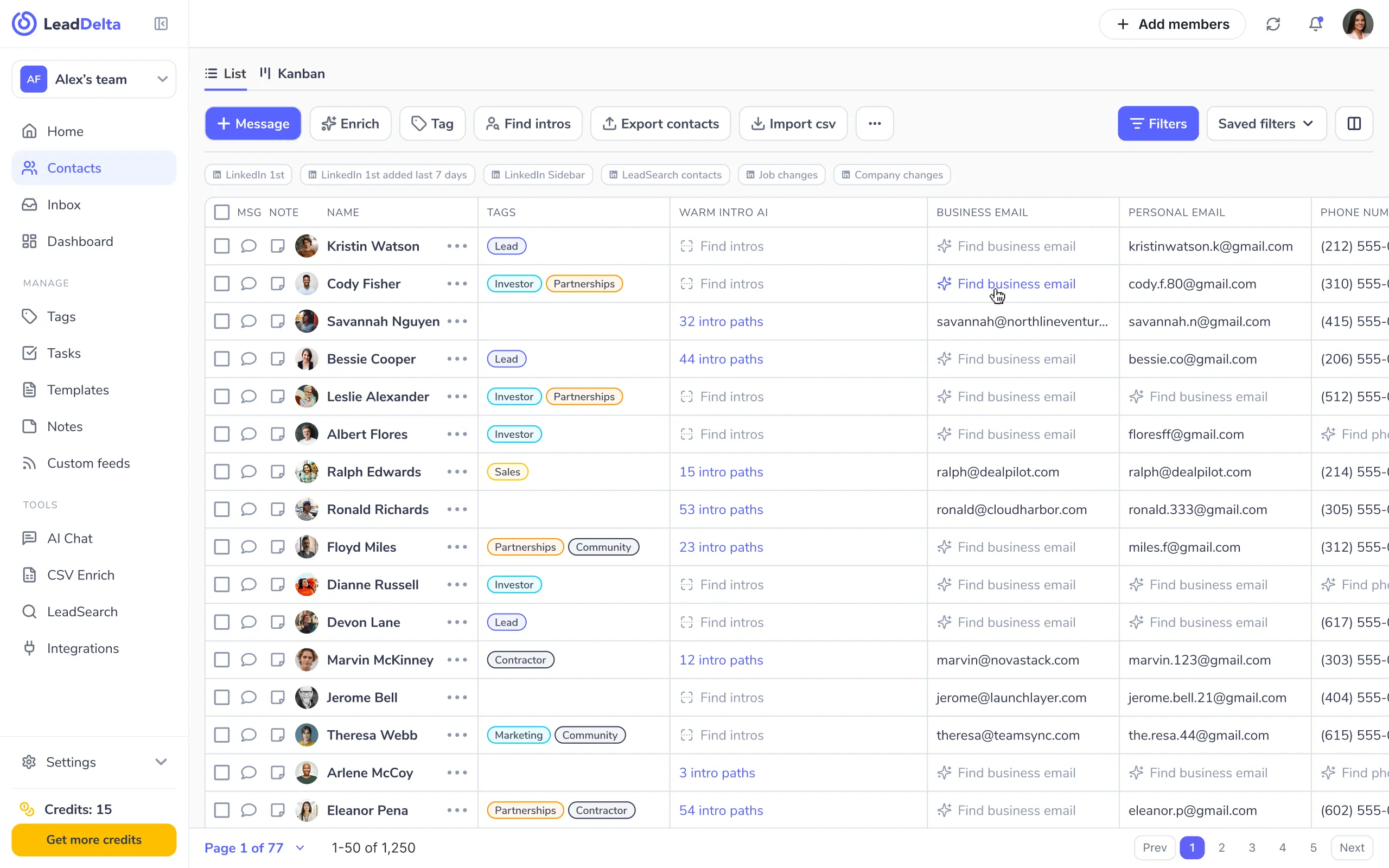
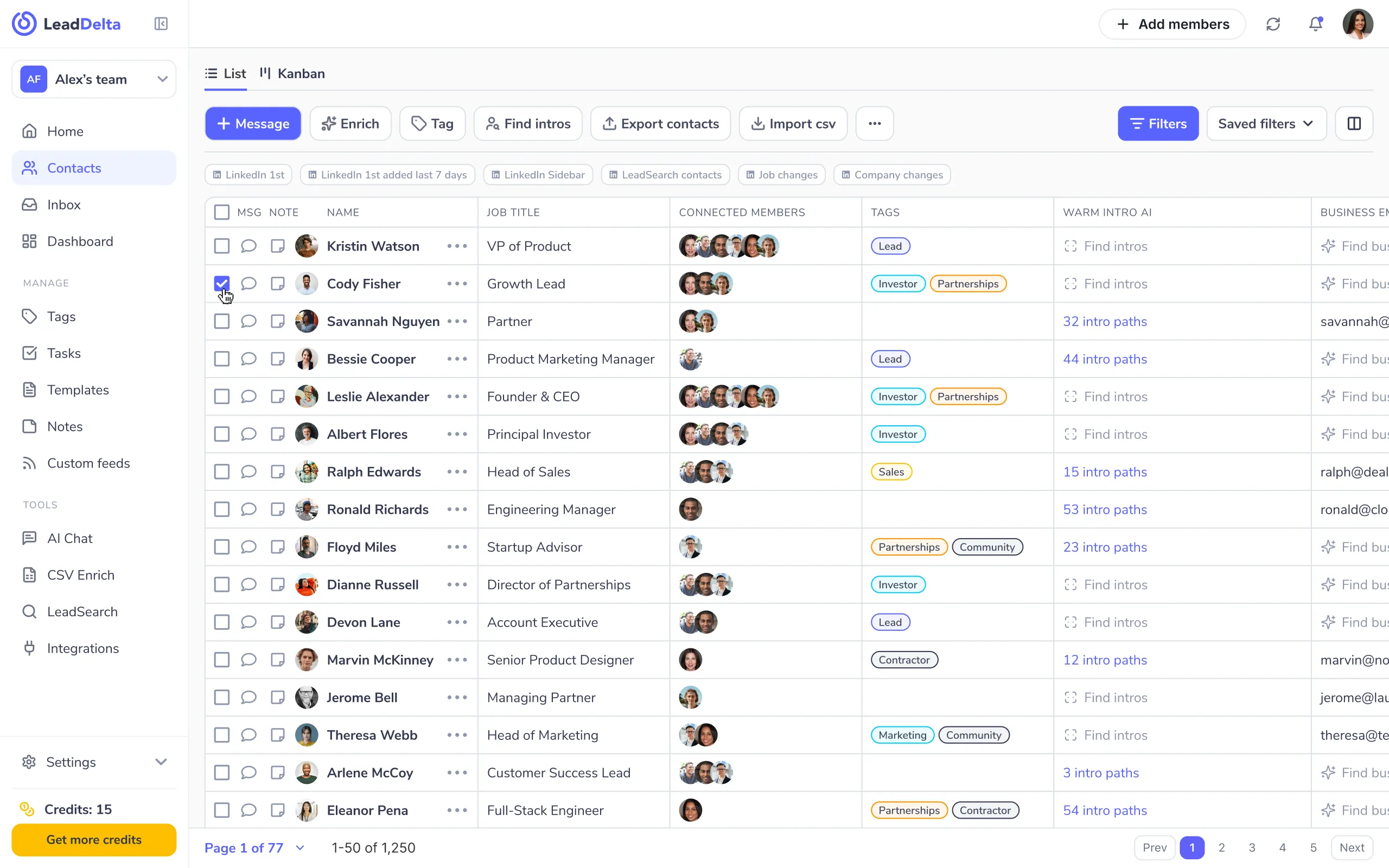
Import every LinkedIn connection, yours and your team's, in one click, and add new leads from any profile or search with the sidebar. Manage all your LinkedIn connections in one place.
Kristin WatsonCody FisherBessie CooperAlbert FloresRalph EdwardsRosa RichardsTag, segment, and enrich your connections automatically. AI sorts your network so the right people surface the moment you need them, your connections become a searchable, filterable CRM instead of an endless list.
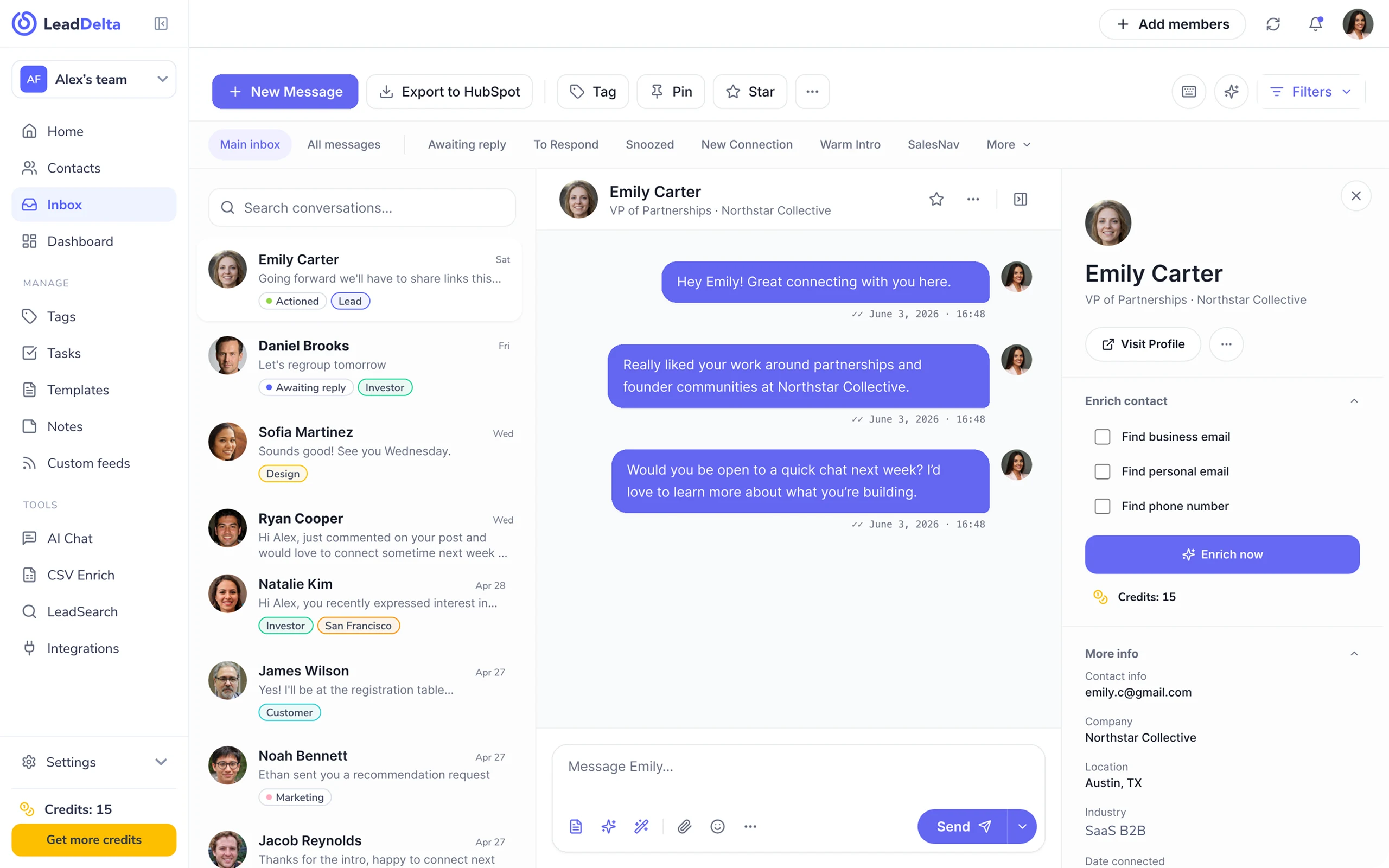
Hi Emily! Great connecting with you.
Hey Alex! Great connecting with you too.
Would you be open to a quick call next week?
Reach people through warm intros, not cold spam. Work every conversation from one AI inbox, replies, notes, and follow-ups in a single view, and turn relationships into deals.
Discover a variety of our advanced features.
Find verified business and personal emails and phone numbers in one click. Credit-based and pay-as-you-go, so you can drop your standalone enrichment tool.
VP of Partnerships · Northstar Collective
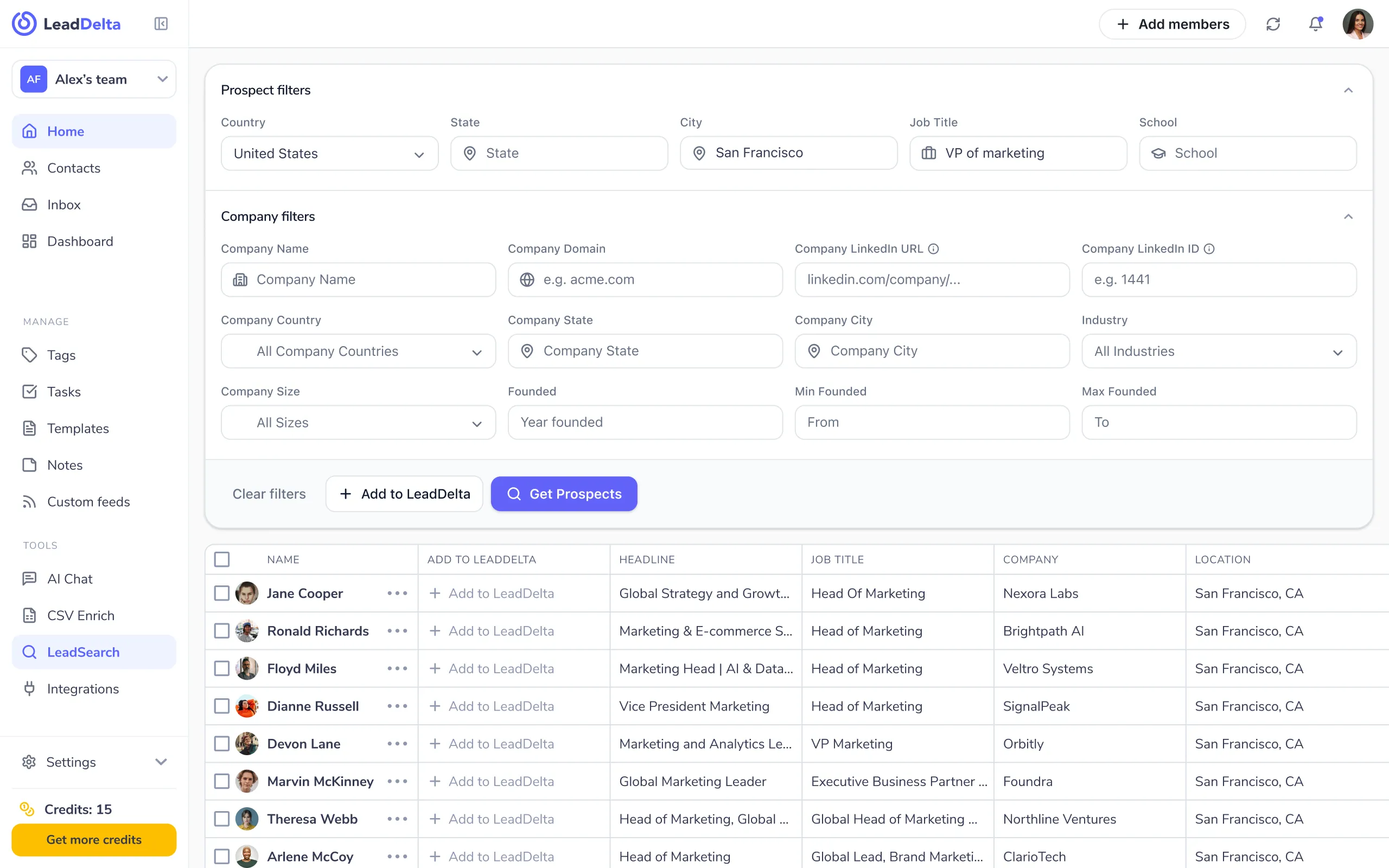
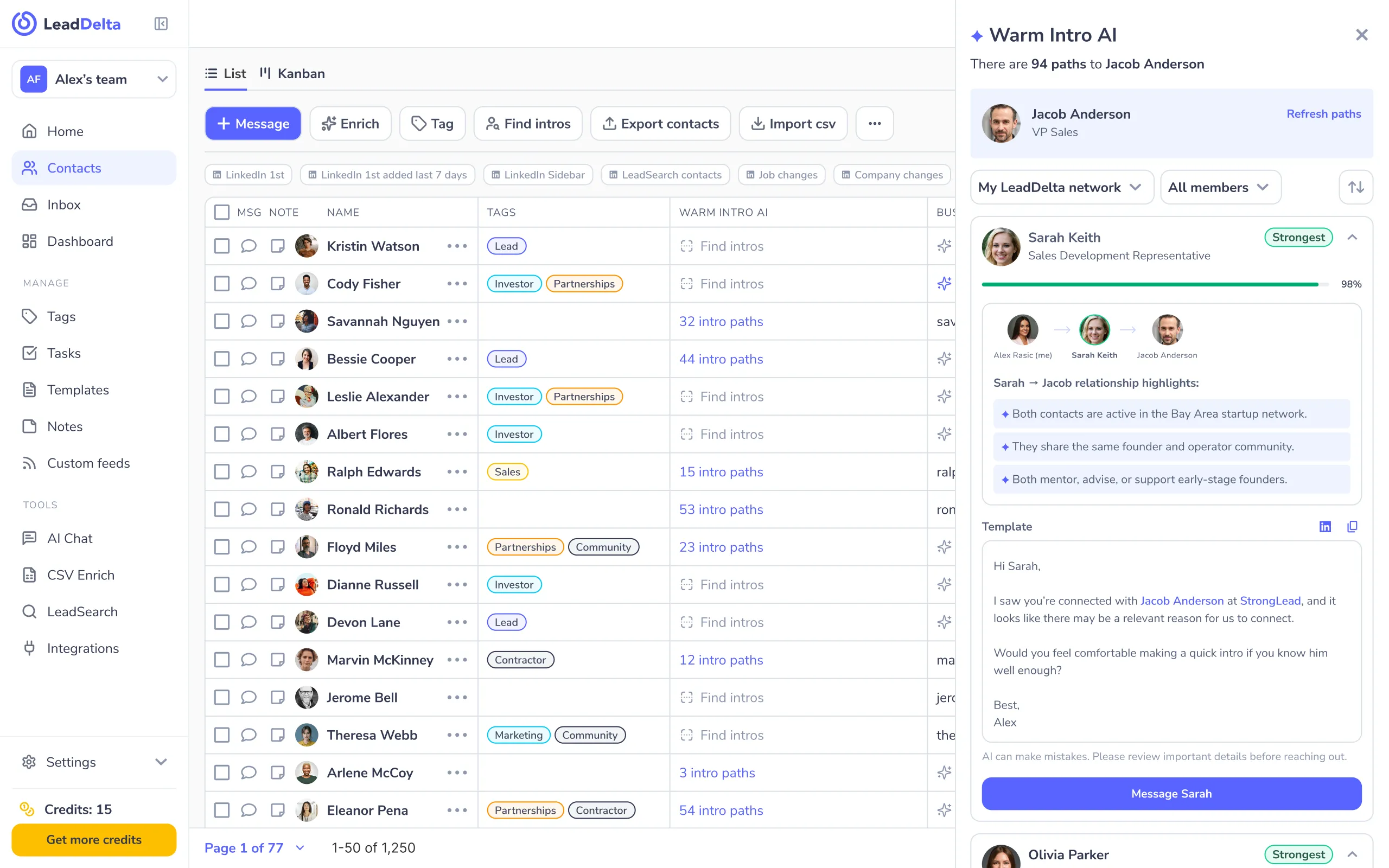
See who on your team already knows the person you want to reach. AI maps the warmest path to any prospect, so you ask for an intro instead of cold-messaging a stranger.
Every LinkedIn message, note, and follow-up in one place. AI cuts the noise, drafts replies, and surfaces the conversations that matter, so your inbox works for you instead of burying you.
Going forward we’ll have to share links this…
Let’s regroup tomorrow
Sounds good! See you Wednesday.
Pool your whole team’s connections into one shared CRM. Everyone sees the full network, collaborates on relationships, and finds intros through each other’s connections, so no relationship goes to waste.
Alex's teamKristin WatsonSavannah NguyenLeadDelta replaces the stack of point tools you’ve duct-taped together. See what your team saves.
Monthly savings
$2,750.00
Annual savings
$27,500.00
LeadDelta syncs with the CRM, email, and calendar your team works in every day — so your network data lives where you need it.


Real teams, real results. Here’s what founders, sellers, and recruiters say about LeadDelta.
As an early adopter, my primary goal was to organize my LinkedIn contacts in a personal CRM – to separate customers, prospects, partners, and personal contacts. Tags are perfect for this. Today, the tool can do much more and has great potential, especially for sales professionals.
One of LeadDelta's most useful features is the ability to easily export profiles from LinkedIn, making it simpler to manage your contact list. Another useful aspect is the option to add custom notes to each contact. The only real criticism I've found of LeadDelta is the lack of automatic cloud synchronization. This means I can't access all my data from different devices. A major advantage of LeadDelta, in my opinion, is its simple and user-friendly interface. You can easily download the software as a Google Chrome extension and use it immediately. Thanks to LeadDelta's ease of use, I can also capture more high-quality leads from LinkedIn more easily.
I appreciate how LeadDelta helps simplify the complexities of managing LinkedIn contacts. The ability to organize and structure my own LinkedIn network and efficiently send personalized messages provides a practical solution to my challenges. The integrated LinkedIn interface is particularly impressive!
For me, the best browser CRM for LinkedIn The best feature is the ability to filter contacts according to numerous relevant criteria, along with the tagging and task functions. This allows you to maintain an optimal overview and communicate effectively with your network. Another highlight is the ability to unfollow or remove multiple contacts simultaneously using the filtering and batch function if they are no longer relevant. A huge plus is the message inbox, mirrored from LinkedIn, which is much larger and more user-friendly. Here, too, you can tag and filter messages. Future plans include the integration of CRMs with LeadDelta, which will further enhance efficiency. I'm still missing some filter functions to more quickly find active LinkedIn users or to identify users with many or few followers. A folder function in the Messenger inbox would also be great. I've been with LinkedIn since day one, and the feature development is fantastic. I can keep track of my network. I can identify and tag leads and make notes on relevant contacts. The new task function lets me set up tasks and reminders. The biggest advantage is that I have all my contact information at a glance and can use it to reach out to them. Network maintenance and hygiene are also possible thanks to the numerous filter functions. And the messenger is much clearer than LinkedIn's small windows.
With LeadDelta, I keep LinkedIn under control. LeadDelta stands out for its exceptionally clear structure, particularly its features for selecting and tagging multiple contacts. The seamless integration of these features into the LinkedIn interface enables a highly intuitive and efficient workflow. For example, contacts can be tagged and notes added directly within LinkedIn. An additional benefit is the ability to add individual, custom notes for each contact. These functionalities contribute to making working with LeadDelta not only efficient but also extremely user-friendly. The only real improvement suggestion I have for LeadDelta concerns the lack of automatic cloud synchronization. This means that accessing all data from different devices is not possible. It would be really great if you could consider adding this feature! The tool is available as a simple Google Chrome extension for immediate download. Thanks to the intelligent tagging function, I can find my direct contacts in no time. The structured organization of my contacts allows me to contact them directly via LeadDelta on LinkedIn. Message management is significantly more efficient compared to the LinkedIn platform itself.
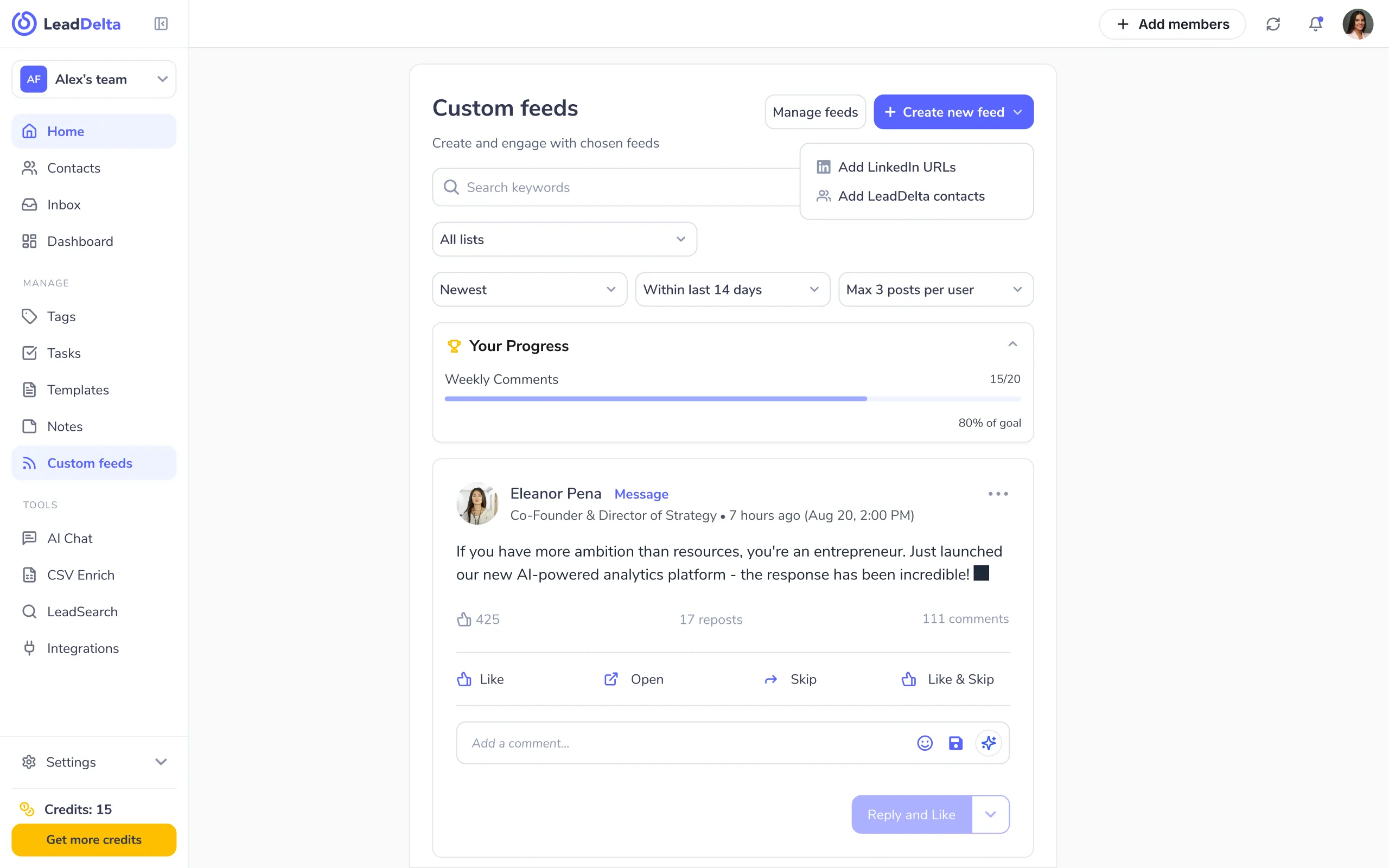
Die Funktionserweiterung für LinkedIn und LinkedIn Sales Navigator, die ich schon seit Jahren vermisst habe! Nachrichten und Kontakten lassen sich Tags zuweisen und so einfach filtern, nachverfolgen etc. Super praktisch ist auch die Funktion, Feeds und Updates von bestimmten Personen separat nachzuverfolgen (statt den kompletten LinkedIn-Feed inklusive Werbung etc. gemischt).
I was using the Lead Delta 7-day trial and developed questions. Their representative was helpful. All my questions were answered in chat and email. Lead Delta also has extensive information about their service in their website’s help section. I chose the pro subscription because I am new to LinkedIn and networking. My school assigned career specialist was impressed with Lead Delta’s capabilities and intends to inform other students about this helpful service. During my 7-day trial, I found the interface intuitive. Managing my LinkedIn contacts has become as simple as managing bookmarks with Bookmark Ninja. Everything is laid out in an open space for a clear view. Specific contact information opens on the right vertically. Space is efficiently utilized. And the optional LinkedIn sidebar feature is impressive. As a recent graduate seeking employment, I can’t afford to take risks with financial decisions. With a supportive environment, clearly detailed help information on their website, and friendly customer service, I felt confident that Lead Delta would effectively support my LinkedIn networking needs. Thank you, Lead Delta!
LeadDelta is the tool everyone should use if they take LinkedIn seriously. It makes networking so much easier and lets me see my network the way I want, with filters and tags, and I can easily view my network breakdown by location, title, and industry. It's a no-brainer, so download today and thank me later.
LeadDelta helps me a lot with managing my connections and organizing my inbox. As a Marketing Lead, I can also unify our team's network and run employee advocacy!
 Ogi MilevJatheon
When I started using this, it increased the efficiency of my linkedin messaging, tagging messages, and there are constant improvements. It's the best CRM for linkedin I've used.
 Chase DiMarco
Great team with a customer centric drive. Super helpful tool to enhance networking on LinkedIn. And great, friendly & fast support! Thanks a lot! Have a wonderful success journey with LeadDelta. I'm a happy customer since 05/2021! Kind regards Tim
 Tim Klein
Great tool. Thanks for the latest update: connecting inbox and profiles. What a great improvement in dealing w/ LinkedIn Connections
 Ulrike Halboth
I have used multiple productivity tools for Linkedin but none compare to LeadDelta´s unique CRM capabilities. A real treasure. Since implementing LeadDelta in my daily workflow, I´ve been able to reach out to my Linkedin contacts using just LeadDelta, no need to bring in any other communication or contact management tool, so I am saving tonnes of time, and I am achieving better results, faster.
 Mike P.
The way it's pulls the data from Linked in so quickly is amazing. You can create custom tags and use templates. The chrome plugin is another bonus! Bulk Messaging is available too. Looking forward to integrations. I've been able to segment my contacts from different industries, much easier than sifting through LinkedIn manually. Time to prune my linked in contact base!
Thanks Leaddelta Team for finally creating a tool to manage my LinkedIn Network in a more efficient way!!! 🙏🏻
 Jens Polomski
Networking is hard. It's a lot of work to maintain relationships with people you don't often interact with, and it's easy to forget about them altogether. That means that your network can become fragmented over time and the people in it will have less incentive to stay connected with you. This leads to missed opportunities for collaboration or even lost business opportunities down the road. That’s where LeadDelta comes in. It imports all your 1st degree connections into the platform so you can focus on doing the work rather than getting distracted on LinkedIn. You can add tags to different prospects, filter to find specific groups of people and send bulk personalized messages to them. And the best part? They strive to become fully compliant with LinkedIn terms and conditions. That means you won’t have to worry about breaking LinkedIn rules or getting your account suspended.
 Ken Moo
4.6/5


4.5/5

4.8/5

4.8/5
Everything you need to know before getting started.
LeadDelta is a LinkedIn CRM with an AI inbox for people who run their business on LinkedIn: founders, sales teams, recruiters, coaches, consultants, and agencies. If LinkedIn is where your pipeline comes from, LeadDelta helps you organize your connections, find warm intros, and work them as a team.
The AI inbox brings every LinkedIn message, note, and follow-up into one place. It cuts through the noise, drafts replies in your voice, and surfaces the conversations that actually need you — so nothing slips through the cracks.
Yes. You can start free, no credit card required — explore the CRM, the AI inbox, and the team features, then upgrade whenever you’re ready.
Absolutely. LeadDelta works alongside LinkedIn without risky automation or scraping. Your data stays yours, syncs securely, and your account stays in good standing.
Yes — it’s the heart of LeadDelta. Pool everyone’s connections into one shared workspace so your whole team can see the full network, collaborate on relationships, and find warm intros through each other.
LeadDelta syncs with the CRM, email, and calendar tools your team already uses — like HubSpot — and connects to thousands of apps through Zapier and Make, so your network data lives where you need it.
Of course. Plans are flexible — upgrade, downgrade, pause, or cancel anytime. No long-term contracts and no hassle.
Join 40,000+ founders, sales teams, and recruiters turning LinkedIn into pipeline.
No credit card required