
If you’ve spent any time networking on LinkedIn, you’ve likely seen the acronym CFBR floating around.
Short for “Comment For Better Reach,” this tiny phrase carries a lot more weight than its four letters suggest.
But CFBR isn’t just another social hack – it’s a smart, community-driven tactic that can help you grow your LinkedIn presence, strengthen connections, and stay visible in the feeds that matter.
When combined with tools like LeadDelta’s Custom LinkedIn Feeds, it becomes even more powerful.
Let’s break down exactly what CFBR is, why it works, how to do it well, and how to supercharge your efforts using LeadDelta.
What is CFBR on LinkedIn?
CFBR stands for Comment For Better Reach – a tactic used by professionals to signal support, boost visibility, and increase engagement on LinkedIn posts.
Here’s how it typically works:
- A user comments something meaningful on someone’s post.
- That comment increases the visibility of the post by triggering LinkedIn’s algorithm to show it to more people.
- In return, the original poster might like or reply to the comment, helping both accounts receive more exposure.
CFBR isn’t about gaming the system. It’s about being active, visible, and helpful inside your network.
So, when you leave a thoughtful comment, you’re helping amplify that post’s reach. LinkedIn’s algorithm picks up on that activity and boosts the post to a wider audience.
But here’s where it gets interesting:
- If you’re active in commenting, your own posts will likely receive more engagement, too.
- The LinkedIn algorithm sees you as someone “engaged in the community,” and that gives you an edge.
- People you comment on are more likely to return the favor.
That’s why the CFBR approach, when used sincerely and consistently, works much better than just clicking “Like” and moving on.
Why Commenting Matters More Than Liking on LinkedIn
A like is passive. A comment is active.
LinkedIn’s algorithm treats comments as higher-value interactions than likes or reactions. Here’s why:
- Comments keep posts alive longer in the feed.
- More comments = more impressions.
- Comments help the original poster feel supported and often lead to reciprocation.
- Thoughtful comments showcase your expertise and keep you top-of-mind.
Put simply: commenting gives you more reach, builds relationships faster, and positions you as someone engaged and valuable.
The Challenge: Staying on Top of the Right Posts
Here’s where most people struggle: finding the right people to engage with consistently.
Scrolling endlessly through LinkedIn, trying to find posts from your leads, clients, or top connections, eats up a lot of time. And even then, you might still miss updates from people who really matter.
This is the single biggest obstacle to executing a strong engagement strategy.
Smarter Engagement with LeadDelta’s Custom LinkedIn Feeds
LeadDelta’s Custom LinkedIn Feeds solve that problem.
Rather than letting LinkedIn’s algorithm decide what you see, LeadDelta gives you full control over your own custom feeds, based on your most important relationships.
Here’s what that means in practice:
🎯 Build Personalized LinkedIn Feeds in Seconds
You can now create custom feeds grouped by:
- Top clients or customers
- High-value leads in your pipeline
- Recently added connections you don’t want to lose touch with
- Thought leaders you admire
- VIPs who’ve gone quiet but still matter
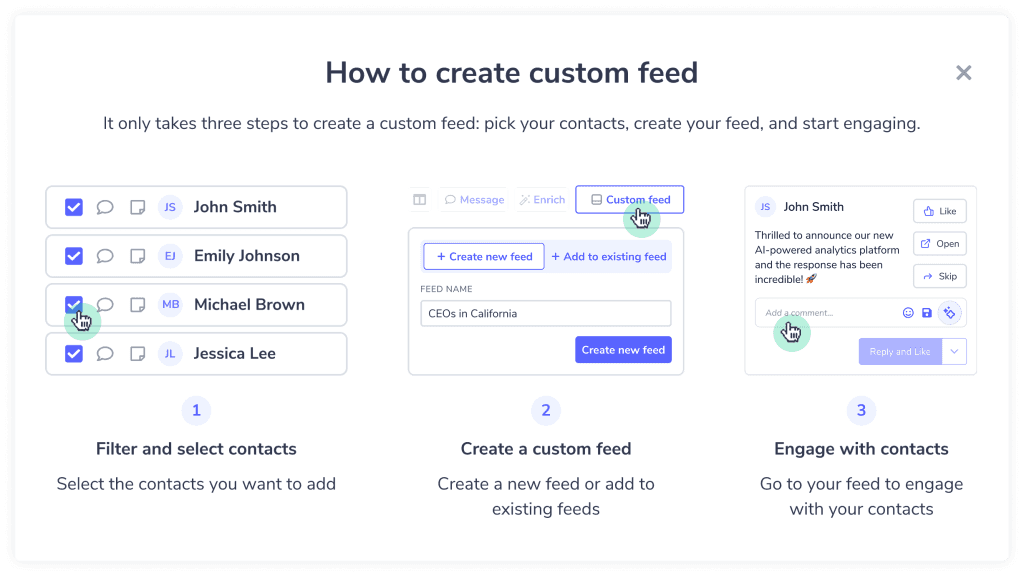
Once your feeds are set up, you’ll have one place to see all their latest posts – without distractions, without missing updates, and without relying on chance.
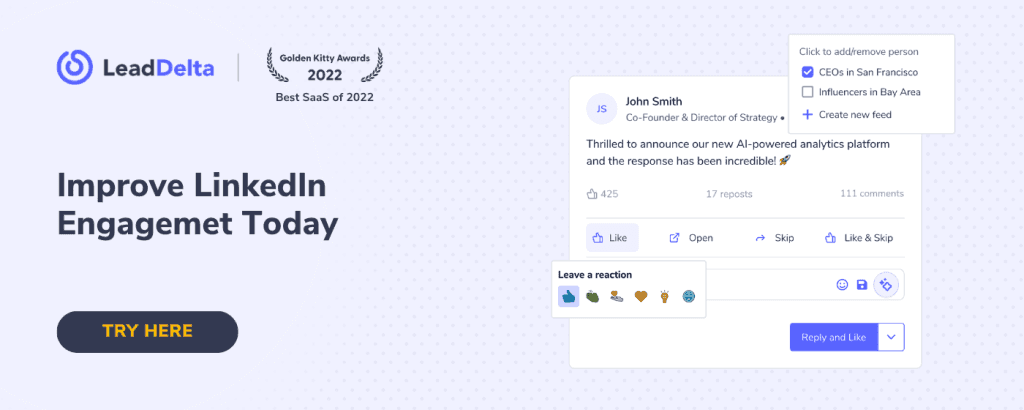
💬 Like, Comment, and Engage – All in One View
No need to hop between profiles or feeds.
From your LeadDelta, you can:
- View the latest posts from your selected list
- Instantly like or leave a comment
- Keep the engagement flowing in under 10 minutes a day
⏳ Save Hours Every Week
This isn’t just about staying active, it’s about doing it efficiently.
With Custom Feeds, you avoid:
- Scrolling endlessly through irrelevant posts
- Missing key updates from people you care about
- Wasting time switching tabs or searching profiles
You show up where it counts, every time.
👉 WATCH: Engage smarter with custom LinkedIn feeds
Bonus: Engagement Progress Tracker
Consistency is everything with CFBR and engagement.
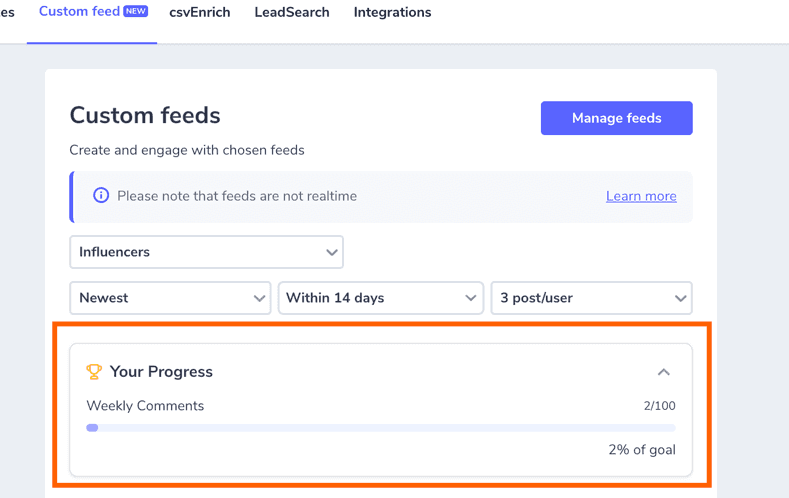
That’s why LeadDelta includes a built-in Engagement Progress Tracker to help you stay on target.
Here’s how it works:
- Set a weekly goal like “Leave 15 comments this week”
- Each time you comment via your Custom Feed, your progress bar updates automatically
- Track your consistency and hit your goals, without needing a spreadsheet or manual tracking
Whether you’re managing relationships or nurturing prospects, this feature keeps you focused and accountable.
CFBR + LeadDelta = Smart, Intentional Networking
CFBR by itself is a smart move. But paired with a system like LeadDelta’s Custom Feeds, you’re no longer guessing who to engage with or when. You’re no longer passive.
You’re now building real visibility, one thoughtful comment at a time, and doing it in a way that actually fits into your workday.
Best Practices to Grow Engagement Through Commenting
If you want to grow your presence on LinkedIn, comments are your best friend. Here are proven tips to make your comments work harder for you:
1. Be Intentional
Only comment when you actually have something to say, or when supporting someone you genuinely want to keep a relationship with.
2. Go Beyond “Great Post”
Use these tactics instead:
- Share a quick insight or experience related to the post
- Ask a follow-up question to keep the conversation going
- Tag someone relevant who would find the post useful
3. Engage With the Right People
Don’t just comment randomly. Focus on:
- Decision-makers in your industry
- Ideal clients or prospects
- Influencers or thought leaders you want to learn from
- Existing customers and partners to stay visible
4. Stay Consistent
Commenting once a week isn’t going to cut it. Aim for daily engagement, even if it’s just 10 minutes a day.
FAQs
Q: What does CFBR stand for on LinkedIn? A: CFBR stands for “Comment For Better Reach.” It’s a tactic to increase visibility and engagement on posts through meaningful comments.
Q: Does commenting actually boost engagement? A: Yes. Comments are one of the strongest signals in the LinkedIn algorithm. They keep content active longer and create two-way visibility.
Q: Can I automate CFBR? A: Automation is risky and often violates LinkedIn’s terms. It’s better to stay personal, authentic, and use tools like LeadDelta to streamline your efforts manually, but intentionally.
Q: How does LeadDelta help with LinkedIn engagement? A: LeadDelta lets you build custom feeds based on key relationships, see updates from the right people, engage without distractions, and track your weekly engagement progress – all from one dashboard.
Final Thoughts
If you’re serious about growing your presence on LinkedIn, commenting is non-negotiable. CFBR is more than a trend, it’s a proven way to stay visible, support others, and spark conversations that lead to real connections.
But commenting without a system burns time and energy. That’s where LeadDelta comes in.
With Custom LinkedIn Feeds, you’re able to engage consistently, strategically, and without the overwhelm. It’s not just about getting more reach, it’s about building relationships that last.
Want to give it a try? Start hitting your engagement goals every week with Custom Feeds. Try today.

