
Most LinkedIn users have their profiles open to the public fully displaying all of their information.
Unlike LinkedIn private mode which hides all of your information on LinkedIn, hiding your profile lets you customize what you want to be seen by the public.
Here’s how to hide information on your LinkedIn profile.
How To Hide Your LinkedIn Profile?
Hiding your LinkedIn profile information is available for all users, both on desktop and mobile.
Here’s how to hide your LinkedIn profile on your desktop:
- Click on your profile picture in the top right corner and click “View Profile.”
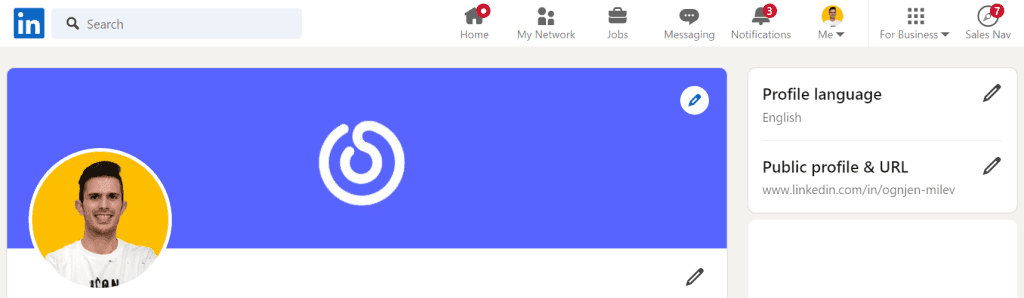
- Click on “Edit public profile & URL” on the right side.
- Under ”Edit Visibility” Look for the “Your profile’s public visibility” toggle and turn if off.
Doing this will completely hide your profile.
But what if you only want to hide certain parts of your LinkedIn profile?
Beneath the profile visibility toggle, you can toggle on/off many options of what information you want to hide.
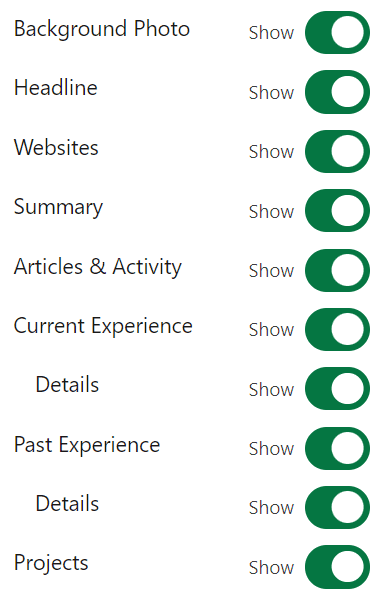
For example, you can hide past experiences and summary while allowing all other information to be seen.
You can even let your profile information be seen only by certain groups of people:

- Your 1st-degree LinkedIn connections
- Your LinkedIn network which includes 2nd and 3rd-degree connections
- Everyone on LinkedIn
- Public – Anyone on and off LinkedIn
What is the difference between hiding a LinkedIn profile and LinkedIn Private Mode?
Hiding your LinkedIn profile means adjusting your profile’s visibility settings to hide specific sections or the entire profile from the public.
In contrast, LinkedIn Private Mode allows you to browse other profiles without them knowing you’ve visited. Private Mode hides your activity from others but does not affect the visibility of your own profile.
Hiding your profile is about controlling who can see your information, while Private Mode is about anonymous browsing.
Read more about LinkedIn Private Mode here.
Why Should You Hide Your LinkedIn Profile?
There are several reasons you might want to hide your LinkedIn profile:
- Keep your job search secret – If you are currently looking for a new job opportunity, you might not want people in your network or your current employer to know you’re actively searching for a new online job.
- Prevent unwanted attention – If you are receiving messages and connection requests from strangers and only want to connect on your own terms, hiding your LinkedIn profile will prevent them from seeing your profile.
- Online privacy – Hiding your LinkedIn profile is great if you want to hide your profile from Google limiting access to your data. This is also a great way to minimize the chances of your data being scraped by different scraping software.
- Taking a break – If you need a few weeks/months away from LinkedIn, hiding your profile is a great way to minimize disturbances and focus on what’s important.
- Updating your profile – Sometimes you are making big changes to your profile and don’t want people to see them until they are finished. Hiding your profile will prevent anyone from seeing what you are working on.
These are all valid reasons for hiding your profile from the public, but it’s important to consider the potential drawbacks such as limiting your visibility on LinkedIn and making it harder to connect with new people.
Best Practices for Hiding Your LinkedIn Profile
Knowing when to hide and unhide your LinkedIn profile is important.
- Only hide your LinkedIn profile when you have a valid reason for it like searching for a new job or researching competitors for example.
- Keep your profile hidden for short periods, a few weeks at most if you don’t plan on your profile being hidden long-term because of privacy.
- Don’t overdo it by hiding and unhiding your profile multiple times in a short period as it will mess with the search algorithm making your profile invisible when you want it to be visible.
Managing Your LinkedIn Connections While Your Profile is Hidden
Even if your profile is hidden, you can still interact with your existing connections. Here are some tips:
- Communicate Directly – Use LinkedIn’s messages to keep in touch with your existing connections. Check out LeadDelta Smart Inbox for better organization.
- Share Updates Privately – You can share posts or updates only with your connections rather than the public.
- Maintain Visibility in Groups – Participate in LinkedIn groups where your activity can be visible to group members but not the general public.
Managing your connections effectively while your profile is hidden ensures you stay engaged with your network without exposing your profile to unwanted attention.
FAQs
Can I hide my LinkedIn profile temporarily?
Yes, you can hide your LinkedIn profile temporarily. You can adjust the visibility settings at any time, allowing you to hide your profile for a short period and then make it public again when you’re ready.
Will my connections be notified if I hide my profile?
No, your connections will not be notified when you hide your profile. However, they might notice that they can no longer view your profile.
Can I still use LinkedIn features if my profile is hidden?
Yes, you can still use many LinkedIn features, such as messaging your connections, viewing job postings, and participating in groups, even if your profile is hidden.
What happens to my endorsements and recommendations when I hide my profile?
Your endorsements and recommendations will still be there when you make your profile public again. Hiding your profile does not delete any information; it simply hides it from public view.
Can I hide specific sections of my profile without hiding the entire profile?
Yes, LinkedIn allows you to hide specific sections of your profile, such as your work experience or education, without hiding your entire profile. This can be done through the public profile settings.
Conclusion
Knowing how to hide your LinkedIn profile helps maintain your privacy or keep your information away from certain groups.
Before you decide to hide your profile think about the reason you want to do it.
By taking control of your profile visibility, you can use LinkedIn effectively while protecting your personal and professional interests.

