
If you’re serious about using LinkedIn as a tool for building your professional brand, closing B2B deals, or growing your influence, then LinkedIn engagement isn’t just a vanity metric, it’s a signal.
It shows that your content connects, that your network listens, and that your voice matters.
This guide will walk you through how to increase LinkedIn engagement, what constitutes a good rate, the tactics top LinkedIn creators are using now, and concrete examples of comments, content, and workflows you can adopt.
What Is LinkedIn Engagement, and Why It Matters
LinkedIn engagement includes any meaningful interaction your content gets: likes, reactions, shares, comments, clicks, and even profile views.
But simply collecting interactions isn’t enough.
What really matters is how those interactions translate into visibility, relationships, and business impact.
Engagement vs. Engagement Rate
Engagement alone is partial. That’s where engagement rate comes in, it gives context. If you have 100 likes but 100,000 impressions, the rate is low. If you get 50 likes on 1,000 impressions, it’s much higher.
Here’s the formula:
Engagement Rate = (Total Engagement ÷ Number of Impressions) × 100%
Where Total Engagement = likes + comments + shares + clicks.
For example: 8,840 impressions and 131 engagements → 131 ÷ 8,840 = 0.0148 → 1.48% engagement rate.
What Is a Good Engagement Rate on LinkedIn?
There’s no universal “magic number,” since niche, network size, and posting frequency all play a role. But generally:
- Under 0.5% = low engagement
- 1–2% = solid for most professionals
- 3%+ = strong engagement
- 5%+ = excellent for niche creators
Instead of chasing a universal number, benchmark yourself. Track your rate over time and aim for steady improvement.
Top LinkedIn Creators’ Engagement Strategies
Learning from what high-performing creators do gives you practical advantages.
Build “Micro-Audiences” with Intention
Top creators don’t rely purely on the algorithm. They build small, strategic engagement circles – clients, peers, mentors- and intentionally interact with them.
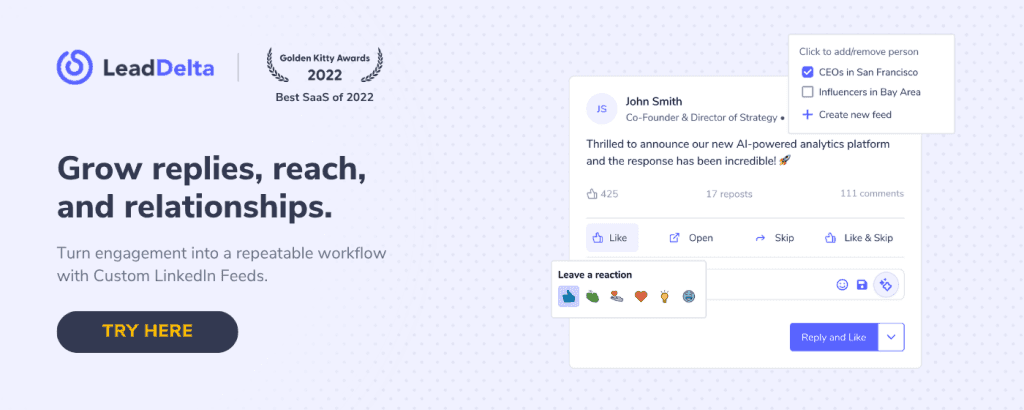
With LeadDelta Custom LinkedIn Feeds, you can replicate this.
Create filtered feeds for:
- Top clients
- High-value leads
- Recently added connections
- Thought leaders
- VIPs who’ve gone quiet
This lets you focus on the people who matter most, ensuring you comment and engage where it counts- without distractions.
👉 WATCH: Engage smarter with custom LinkedIn feeds
Drop Value Upfront and Prompt Comments
Top-performing posts usually start with a strong hook, immediately deliver value, then end with a question.
Example post formula:
“Just finished a 90-day experiment on video outreach. Here’s what worked (and didn’t). Would you try it?”
This structure encourages conversation. Comments fuel visibility, and LinkedIn rewards interaction.
Comment Early and Use a “First Comment” Strategy
Posts that get traction early perform better. Comment within the first 30 minutes to signal to LinkedIn that your post is active.
Many creators also leave a first comment themselves with a resource, poll, or follow-up question.
Leverage Formats That Invite Interaction
Creators mix up content formats:
- Polls that invite fast participation
- Carousels that share step-by-step lessons
- “Behind-the-scenes” videos showing real moments
- “Challenge” posts that ask readers to take action
Interaction-friendly formats trigger discussion, which multiplies reach.
Respond Thoughtfully to Comments
After posting, don’t disappear. The second wave of engagement comes from your replies. Tag people, thank them, and ask follow-ups.
For best results, reply in two waves: a few hours after posting, and again 12–24 hours later. This keeps the thread alive and visible.
Invite User-Generated Stories
Posts that ask your audience to share their own experiences perform incredibly well. Example:
“What’s one lesson you learned about client onboarding this year?”
People love to share opinions, and when they do, they often tag others, further expanding reach.
Measure, Iterate, Improve
Track performance by format, time, and content type. When something performs well (like a behind-the-scenes post or data insight), post more of it.
Data-driven iteration separates top creators from casual users.
How to Calculate and Track Your LinkedIn Engagement Rate
Use the formula to find your current average, then set a goal to improve.
Step-by-step:
- Choose a time frame (last 30 days or last 10 posts).
- Collect your impressions and engagements.
- Apply the formula: (Total Engagement ÷ Impressions) × 100.
- Calculate your average engagement rate.
- Set a target (e.g., +0.5% in the next 30 days).
- Track consistently.
Pro tip: Monitoring trends is far more valuable than any single post’s performance. A rising engagement trend means your content is connecting.
Professional LinkedIn Comment Examples
High-quality comments show thought leadership and deepen relationships. Use these templates to engage intentionally.
Insight + Tag + Question
“Loved this, @Jane. Your point about pitching outcomes before features is gold. We’ve seen better conversion when we do the same. How do you phrase that in your conversations?”
Share Your Experience
“Interesting post, @Mark. We tried a similar approach with shorter demos and saw 20% more signups. Do you think timing plays a role here?”
Invite Broader Participation
“Spot on, @Linda. Anyone else tried switching their LinkedIn ‘About’ section to outcome-based language? Curious to hear your take.”
Add a Tip or Insight
“Great insights 💡 @Carlos. We do twenty ‘relationship comments’ a week in our LeadDelta Custom Feed, it keeps engagement consistent without feeling forced.”
Commenting Best Practices
- Comment early and often, especially on VIP connections.
- Ask questions or tag others to spark discussions.
- Turn valuable comment threads into new content ideas.
- Use LeadDelta Custom Feeds to manage who you engage with, ensuring your comments always go to the right person’s post.
👉 READ: Comment For Better Reach on LinekdIn
Content Strategies and Optimization Tips
Use Varied Content Formats
Mix different types to test what your audience engages with most:
- Short text posts (100–200 words)
- Carousels or document posts
- Quick videos (under 90 seconds)
- Behind-the-scenes updates
- Stats and insights from your niche
- Polls or “this or that” style prompts
Consistency Beats Frequency
Two or three solid posts per week work better than inconsistent bursts. LinkedIn’s algorithm rewards reliability.
Optimize Posts for Discovery
- Use 2–3 relevant hashtags (no more).
- Tag one or two relevant people.
- Open strong- your first line should grab attention.
- Add a call-to-action in the form of a question.
- Engage in the first 1–2 hours after posting for best visibility.
Avoid Common Mistakes
- Don’t overpromote your product. Educate first.
- Don’t ignore comments- reply and keep the thread active.
- Don’t post too many hashtags or random tags.
- Don’t stop experimenting- LinkedIn’s algorithm evolves constantly.
How LeadDelta Custom Feeds Help Boost Engagement
Build Custom Feeds That Focus on People Who Matter
Rather than letting LinkedIn’s algorithm choose what appears in your feed, LeadDelta Custom Feeds give you full control. You decide whose content you want to engage with.
You can group feeds by:
- Top clients
- Warm leads in your pipeline
- Thought leaders and peers
- Recently added connections
- VIPs or silent supporters
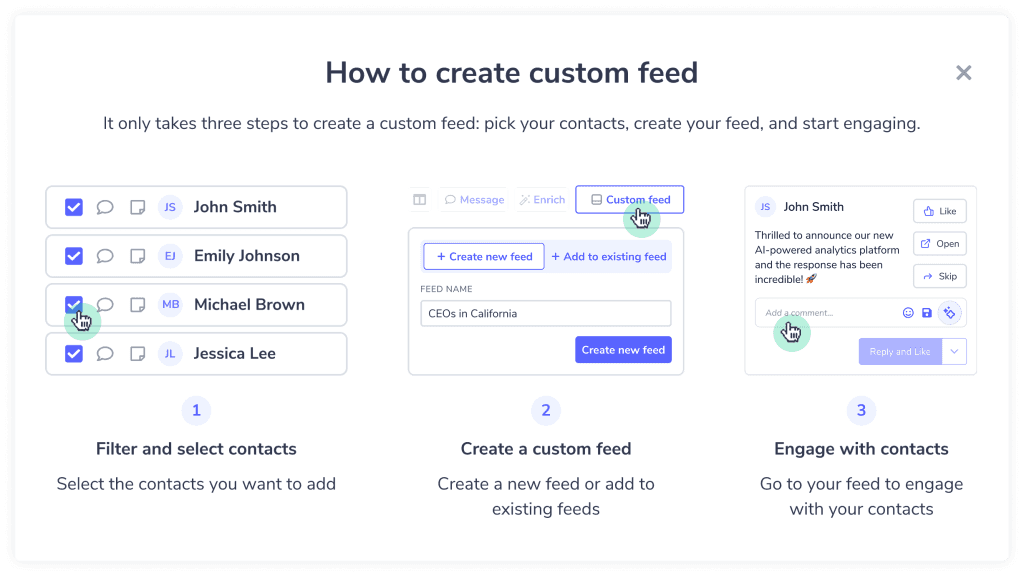
Once set up, you’ll see their posts all in one view- no distractions, no missed updates. You can like, comment, and engage, all from one dashboard.
Why Custom Feeds Boost Engagement
- You show up consistently in the feeds of people who matter.
- Engagement becomes intentional- not random scrolling.
- Reciprocity increases; people you engage with are more likely to engage back.
- Your engagement rate improves because your content gets attention from relevant contacts.
- The Engagement Progress Tracker inside LeadDelta lets you set goals (like “Leave 15 comments per week”) and automatically tracks your progress.
Example Use-Case
Imagine you’re a B2B consultant. You create a custom feed with 25 target clients and 10 industry peers. You spend 10 minutes each morning commenting and liking their posts.
Within a month:
- You’ve built visibility with key decision-makers.
- They start commenting back on your posts.
- Your engagement rate climbs from 1% to 1.6%. That’s the power of consistent, strategic visibility.
Frequently Asked Questions
What’s a good engagement rate on LinkedIn? 1–2% is solid. 3–5% means you’re connecting deeply with your audience.
Should I post daily? Only if you can maintain quality. 2–3 valuable posts a week perform better than daily filler content.
How many hashtags should I use? Two or three well-chosen hashtags per post are optimal.
What post length works best? 100–200 words are ideal for most posts. Keep them clear and actionable.
Do behind-the-scenes posts really perform well? Yes. Authentic, transparent posts consistently receive more comments and reactions.
How can I use comments strategically? Engage first with people in your LeadDelta Custom Feed, and always ask a question to spark further discussion.
Your 30-Day LinkedIn Engagement Plan
Week 1:
- Calculate your baseline engagement rate.
- Set up 2–3 Custom Feeds in LeadDelta.
- Spend 10 minutes a day commenting on your VIP list.
Week 2:
- Post twice this week: one personal insight and one data-driven post.
- Track which performs better.
Week 3:
- Experiment with a carousel or short video.
- Continue consistent engagement via Custom Feeds.
Week 4:
- Use your best-performing format again.
- Check your engagement rate.
- Review progress in LeadDelta’s Engagement Tracker.
By the end of the month, you’ll not only improve your engagement numbers but also strengthen relationships that matter most.
Conclusion
Boosting your LinkedIn engagement is less about chasing numbers and more about building meaningful visibility.
When you pair intentional engagement with LeadDelta Custom Feeds, you eliminate the guesswork.
You’ll engage where it counts, track your growth, and turn interactions into opportunities.
Start today: comment with intention, post with purpose, and make engagement a daily discipline.
Your LinkedIn presence will thank you for it.

