
We all want more connections on LinkedIn as we are in turn getting access to more opportunities.
However, having a huge LinkedIn network may hinder your growth if your connection list is filled with irrelevant connections.
If this sounds familiar, maybe it’s time to clear out your network.
But how many connections are too many? And more importantly, if you do have too many connections, how do you remove them?
Can you have too many LinkedIn connections?
Once you hit 500+ connections, you’ll already have incredible reach and visibility, and when you reach over 5,000 connections, you can do some serious LinkedIn growth magic.
However, you can’t endlessly grow your network – LinkedIn only allows you to have up to 30,000 1st-degree connections.
LinkedIn recommends that you only connect with individuals you know and trust. They also suggest managing your connection list and maintaining only those that bring you the highest relationship value.
When it comes to your LinkedIn profile, quality is more important than quantity. More isn’t always better.
Why you should remove LinkedIn connections
While networking, we get connected to lots of people, and in just a few months, you can reach 1000s of connections.
Not all of these connections should stay in your network, and there are many benefits to removing them.
These are the most common reasons:
- You get connected with someone just to keep in touch. However, after some time, you realize they don’t add value to your network.
- You realize that a person who engaged with you a lot when you first connected isn’t even active on LinkedIn anymore, being just a ghost connection.
- You might have a lot of LinkedIn connections that don’t engage with your content, lowering the reach of your posts. The relevance of your connections is a crucial factor when it comes to pleasing the LinkedIn algorithm.
- You might be having a lot of spammy connections trying to pitch to you all the time, or inviting you to events that don’t provide you with any value.
- You connected with random people to get to 500+ connections fast.
So, how do you go about “pruning” your LinkedIn network and getting rid of irrelevant and inactive connections?
LinkedIn provides a feature “Remove Connections”.
When you go to your “Connections” page, you will see a remove button next to each name. By clicking on the remove button, you can remove that connection from your LinkedIn connection list.
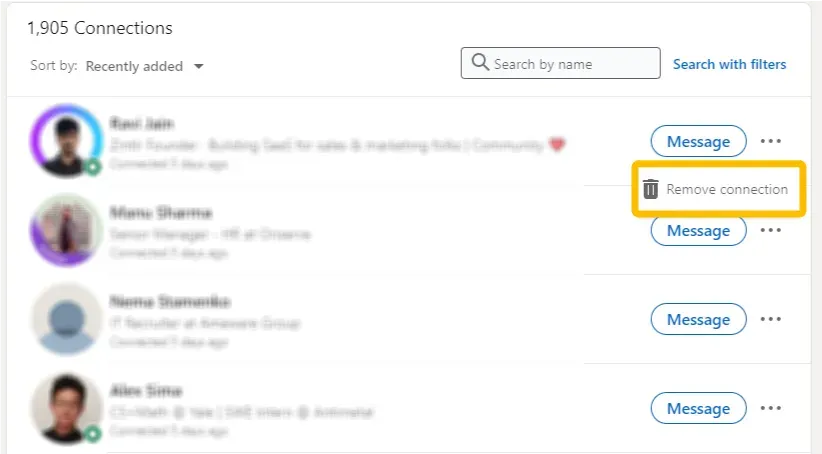
However, this is manual one-by-one work that is tedious and time-consuming.
Furthermore, LinkedIn does not allow you to view a history of connections you have removed.
But there’s an easier way to remove multiple LinkedIn connections at once.
How to remove LinkedIn connections in bulk with LeadDelta
LeadDelta is a simple LinkedIn CRM that allows you to have a clearer view of your network and manage it the way you want.
One of its many features is the ability to remove connections in bulk.
Step-By-Step Guide
- Create an account with LeadDelta on a Starter, Pro, or Business plan
- Make sure you have the LeadDelta Chrome App installed
- Make sure your connections have Synced (latest state)
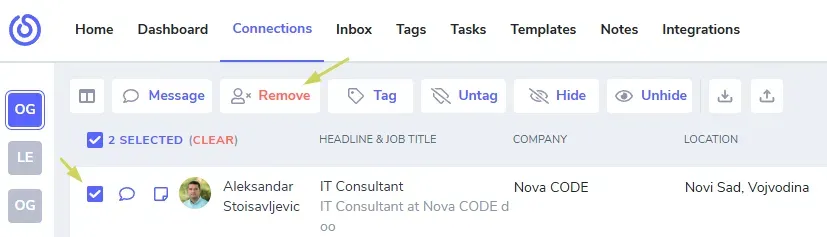
After your connections are synced, you can select who you want to disconnect by clicking the checkboxes next to their profile pictures. Then, click the Remove button.
Once you select it, a popup will appear asking for your confirmation and what action you want to take. This will initiate SCHEDULED removal.
Note: Your computer must be on, internet stable, logged in to your LinkedIn and LeadDelta, with installed LeadDelta extension.
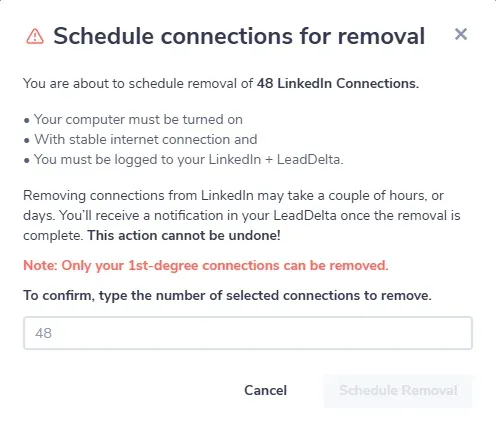
Confirm your action and let LeadDelta do its magic.
You can see those connections inside LeadDelta under Auto Tags.
The contacts who are in the process of being removed will be automatically labeled with the Removal Scheduled Tag. Upon successful removal, they will be tagged as LD Removed.
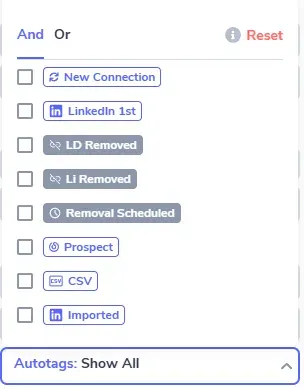
This way, you can easily distinguish disconnected contacts from those you are still connected with on LinkedIn.
This also means that you can track who disconnected from you on LinkedIn by filtering the Li Removed tag.
Disclaimers
It’s important to understand that LinkedIn doesn’t like to see suspicious activity on its platform.
This also includes disconnecting from lots of people in a short period, especially if you aren’t very active on LinkedIn.
- You can schedule as many removals of your personal 1st-degree connections that are synced to LeadDelta.
- On the LeadDelta trial, the total limit is set to 25 removed connections, so you can see how it works.
- On our paid plans, we will remove up to 80 connections daily. You can keep adding more connections for removal, and they’ll be added to the bottom of the operation.
We set up that limit to protect you from LinkedIn bans.
Remember, the more you use LinkedIn, the less suspicious you are, making it easier to remove more connections in bulk.
Benefits of Using LeadDelta to Remove LinkedIn Connections
The main benefits of using LeadDelta to remove LinkedIn connections:
- You can filter the exact connections you want to remove
- You will save time not having to remove them manually
Why Should You Keep Connections Data Inside LeadDelta?
You might want to delete your connections altogether with their data, but there’s a reason not to do that.
You can use their data in three different ways:
- Sometimes, it’s just not the right time to be connected to someone (you haven’t talked to them, and they aren’t your ICP…), but in the future, you might be looking for a specific person who fits their profile. Luckily, if you kept their data inside LeadDelta, you will be able to see their information, and if they fit the profile you are looking for, you can just reconnect with them and start a conversation.
- You can export all your connections from LeadDelta and get connection details in CSV format. This allows you to remove connections from both LinkedIn and LeadDelta while still preserving relevant information you might need down the line.
- Maybe you don’t need those connections in your network, but your team might find them useful. By using LeadDelta for teams, you can share your connections with your team, even the ones you disconnected from, and they can use them for sales, recruiting, connecting…
Frequently Asked Questions (FAQs)
How can I remove multiple LinkedIn connections at once?
Tools like LeadDelta allow you to filter and select multiple connections for bulk removal with just a few clicks, significantly reducing the time spent compared to manual methods.
Does removing LinkedIn connections notify the other person?
No, LinkedIn does not notify users when they’re removed from someone’s connections list.
What are LinkedIn’s limits on removing connections?
LinkedIn doesn’t publicly specify daily removal limits, but removing too many connections rapidly might trigger security measures. It’s advisable to space out bulk removal activities.
Is it possible to filter inactive or irrelevant LinkedIn connections?
Yes. Using LeadDelta, you can easily filter connections by professional relevance or interaction history, making your network cleanup efficient.
Can I re-add a LinkedIn connection after removal?
Yes, but you’ll need to send a new connection request, subject to their acceptance.
What are the benefits of cleaning up my LinkedIn network?
Cleaning up your network ensures your feed stays relevant, increases post visibility and engagement, enhances your professional branding, and streamlines future networking efforts.

