
Someone in your network just updated their profile:
“Thrilled to start a new chapter as Head of Sales at X!”
That post gets hundreds of likes, but most people scroll past it. The smart ones don’t. They reach out. They use that moment to reconnect, start a conversation, or identify a new opportunity.
That’s exactly what LeadDelta’s new Job & Company Change Signals help you do – automatically.
You get notified when someone in your network (or your team’s network) changes jobs or companies. Then, with one click, you can re-engage with perfect timing.
Below, we’ll break down how to turn these signals into real business outcomes.
Why This Moment Matters
A job change is a micro-window of opportunity – short, but powerful.
Here’s why:
- New roles = new challenges. They’re rethinking priorities and exploring tools to succeed.
- New budgets = new buying opportunities. Many new leaders have discretionary budget to make early wins.
- New team = new relationships. They’re actively rebuilding their ecosystem – and that’s when your message feels most relevant.
If you wait too long, you lose momentum. But if you’re first, your message lands before the inbox floods.
That’s where LeadDelta keeps you one step ahead.
How LeadDelta Alerts Help You Capitalize
What a Job Change Signal Looks Like in LeadDelta
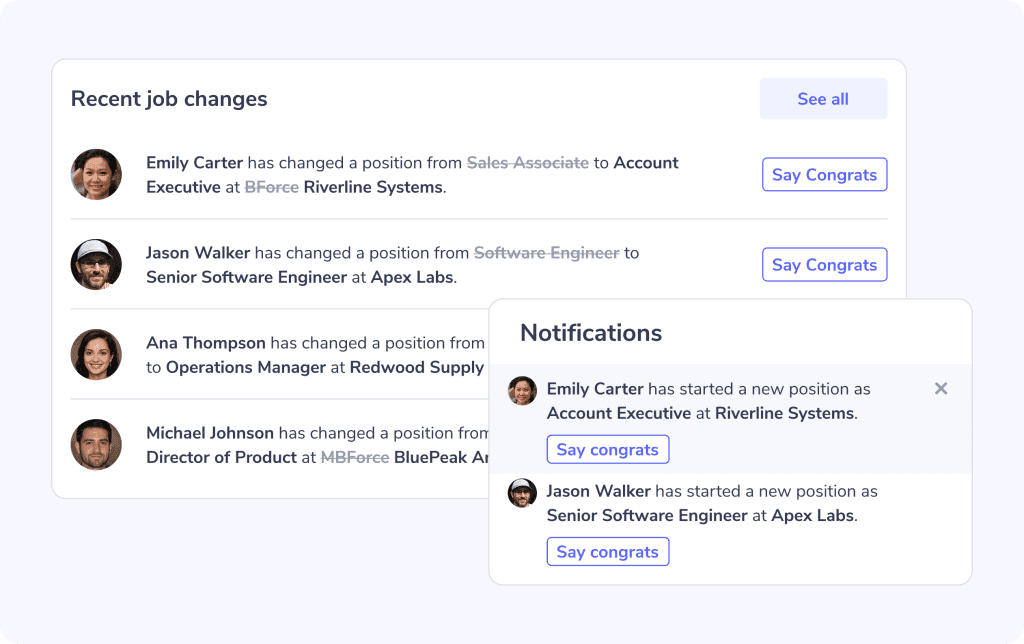
When someone in your LinkedIn network updates their job title or switches companies, you’ll see a signal right on your LeadDelta Home Page – no need to dig through your LinkedIn feed.
- A clear notification tells you what’s changed (new title or company).
- A “Say Congrats” button appears next to their name.
- Click it → a chat window pops up → a draft message appears → send in one click.
It’s quick, thoughtful, and saves you from the friction of manually writing every message.
And if you’re on a team plan, these signals extend across your team’s shared network – all team members get visibility into relationship shifts.
Suggested Workflow
- Receive the alert on your LeadDelta dashboard or check your LeadDelta Home Page.
- Check their profile – Are they relevant?
- Decide ownership – is this your contact or your teammate’s?
- Click “Say Congrats,” personalize, or send the message we craft for you.
- Tag the outreach in LeadDelta inbox (e.g., “job-change outreach”).
- Follow up within a week if needed.
This workflow keeps your outreach timely and measurable.
The Benefits
- You stay proactive – no more reactive scrolling.
- You save time – less manual tracking, more smart engagement.
- You increase visibility – across shared networks.
- You boost response rates – because timing matters more than tone.
Outreach Playbook
Message Templates That Work
For a weak connection:
Hey [Name], Congrats on your new role as [Title] at [Company]! That’s an exciting move. I’d love to hear how you’re thinking about [specific challenge related to your solution]. We’ve seen teams in your space make some great early progress with [short example]. Best,
For a stronger relationship:
Hi [Name], Big congrats on the new chapter at [Company]! I remember our chat about [past topic] — looks like this role aligns perfectly. Curious how you’re planning to approach [specific challenge]? We recently helped a similar team hit [result]. Always happy to swap ideas if that’s helpful. Cheers,
More tips:
- Mention the new role/company.
- Add something personal or contextual.
- Keep the tone supportive, not salesy.
- Offer value or curiosity – not a pitch.
Segmenting Outreach by Relationship Strength
- Strong connections: Be conversational and specific, refer to shared history.
- Weak connections: Keep it short and inquisitive; focus on learning.
- Team connections: Mention shared colleagues, “I saw we’re both connected through [Name].”
LeadDelta’s shared visibility lets you decide who in your team is best placed to message – turning overlap into coordination.
Follow-Up Strategy
If they respond:
- Acknowledge their message.
- Offer a helpful next step (e.g., share a resource, schedule a short call).
- Keep the tone warm and collaborative.
If they don’t respond:
- Wait a few days, then follow up with light context – e.g., “Hope onboarding’s going well!”
- If still no reply, add them to a nurture sequence or revisit next quarter.
- Keep the relationship open; timing shifts again later.
Job Changes = Reliable Triggers for Real Outreach
Your network changes daily, and those changes are signals. Someone moving into a new role or company often opens an entirely new chapter of opportunity.
With LeadDelta’s Job & Company Change Signals, you can now see those shifts instantly and respond while they’re still meaningful.
The next time a contact moves, don’t just “like” the post – send a thoughtful message. A small, timely gesture can lead to a revived relationship, a new deal, or even a long-term partner.
FAQ
Q: How soon after someone changes jobs should I message them? Within 7 days. Early enough to be noticed.
Q: What should I say when someone moves to a new company? Keep it warm, personal, and relevant – congratulate, then ask about their new priorities.
Q: Do job changes really create sales opportunities? Yes – a role change often brings new budgets, mandates, and openness to tools that help early wins.
Q: How can I track these job changes effectively? Use LeadDelta’s job-change alerts to monitor your and your team’s networks.

