
Effective LinkedIn management allows you to strategically utilize the platform to reach your goals.
Maybe you’ve taken the first steps by creating a profile, making a few connections, or even posting once or twice per week.
But it hasn’t clicked yet.
Your profile isn’t gaining traction, your connections aren’t leading to conversations, and you’re not seeing the growth or engagement you hoped for.
If that’s where you’re stuck, don’t worry, we’ve got you covered.
Here’s what mastering LinkedIn management can do for you:
- Build a network of quality connections that add real value to your professional goals.
- Stay on top of communication, so you never miss an important opportunity.
- Share content that encourages engagement, positioning you as someone worth following.
When you get these areas right, LinkedIn transforms from “just another platform” into a great tool for personal and professional growth.
Keep reading to learn how you can master each of these areas and start making LinkedIn work for you today.
How To Build a Strong LinkedIn Network
A strong LinkedIn network is a curated group of professionals who align with your goals, share valuable insights, and contribute to interactions that drive collaboration, learning, and opportunities.
Build a Quality Network
Your network is the backbone of your LinkedIn experience, so focus on quality over quantity.
Here’s how to build a network that truly supports your goals:
- Focus on professionals who align with your industry, interests, or career aspirations. This ensures your feed remains relevant and valuable.
If you connect with people at scale and reach your weekly connection limits, LeadDelta Sidebar enables you to add your 2nd and 3rd connections to our CRM and connect with them later.
- A generic “Let’s connect” doesn’t stand out. Mention something specific, like a shared connection, an event you both attended or something they’ve posted. Personalized requests lead to better engagement.
- Use LeadDelta to categorize your connections with tags and notes. For example, label contacts as “clients,” “lead,” or “potential collaborators” for quick access and better management.
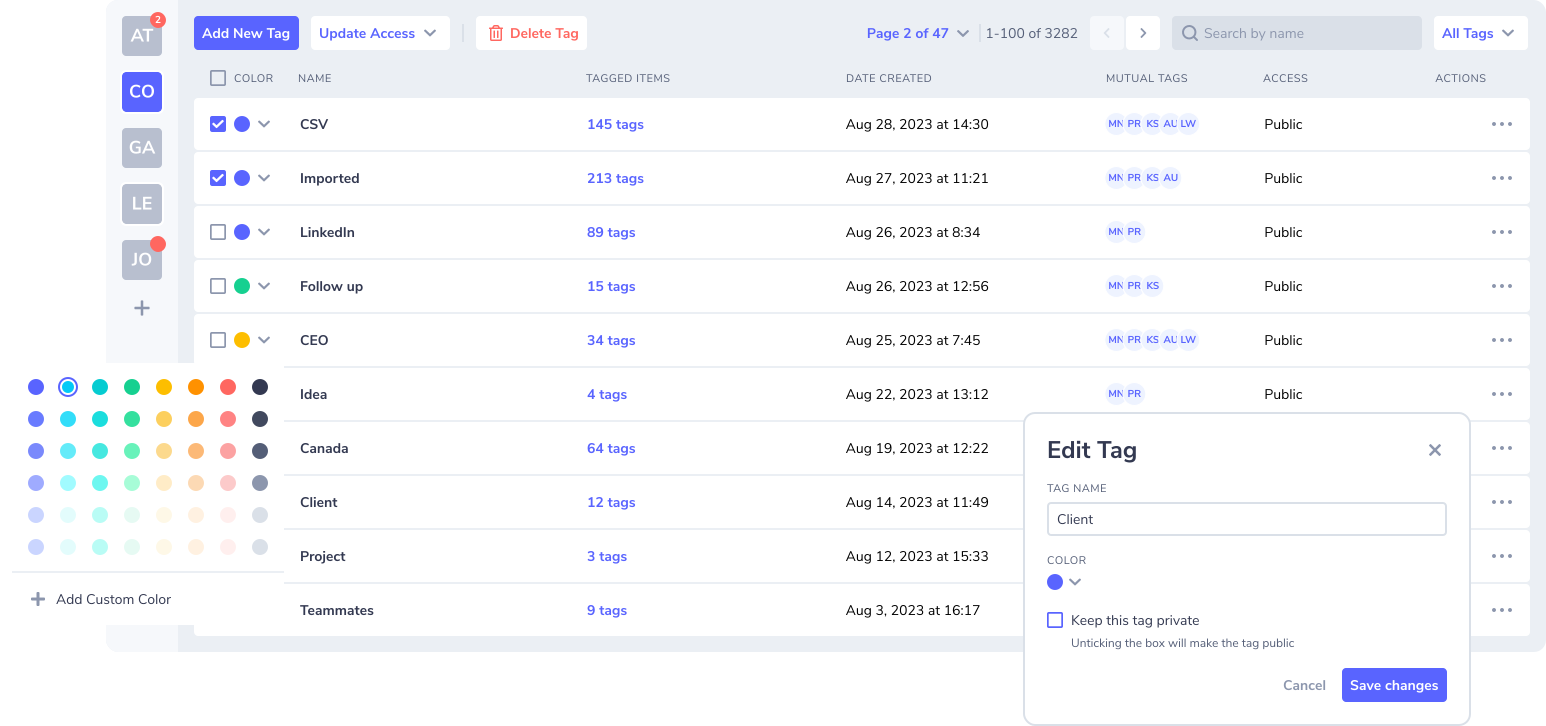
Tags and notes in LeadDelta allow you to get the most out of your network by keeping your most important contacts easily accessible.
Disconnect When Necessary
Not every connection is worth keeping. Over time, some may become inactive, irrelevant, or no longer aligned with your goals. Here’s how to maintain a meaningful network:
- Regularly review your connections – Take time to audit your connections and remove those that no longer add value.
- Focus on quality – A smaller, engaged network is more impactful than a large, inactive one.
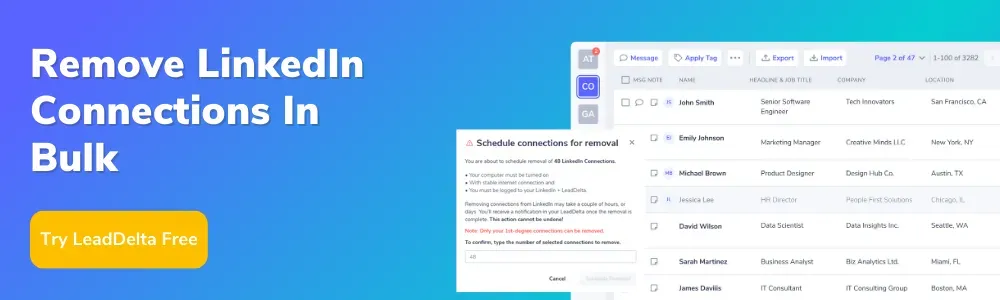
If you want to speed up your multiple disconnects, LeadDelta offers a bulk disconnect option.
Engage With Important Contacts
Building relationships requires consistent and intentional engagement.
Here’s how to nurture your network:
- Engage with their content – Like, comment, and share posts from your important contacts. This shows interest in their work and keeps you at the top of their mind.
- Stay in touch – Schedule regular check-ins with important connections. A simple message or comment can go a long way.
Make the most of LeadDelta’s Tasks & Reminders to stay organized and proactive in your networking efforts.
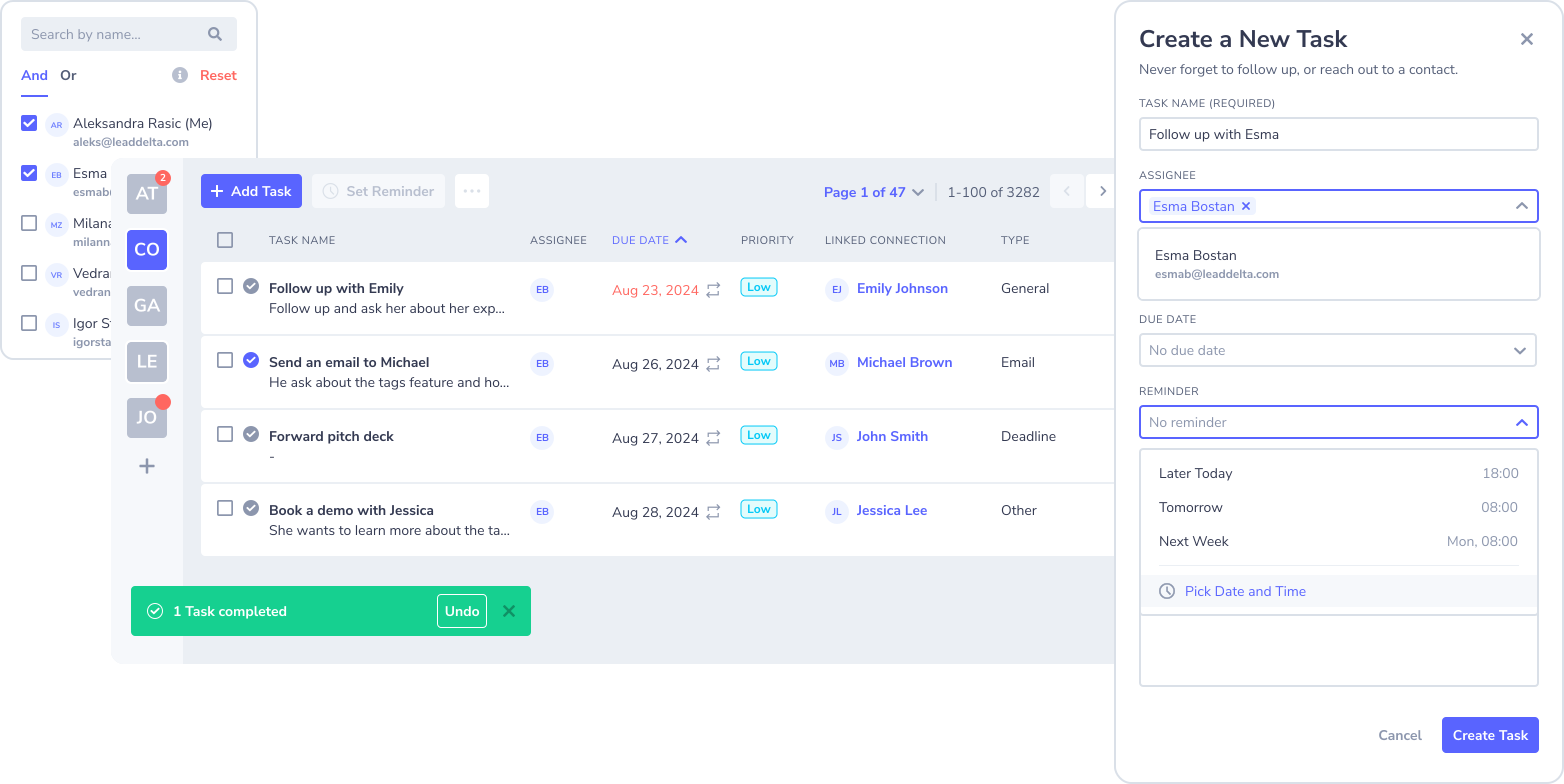
*Each time when you create a task inside your workspace, you’ll get reminders in your email.
First Touch Matters
Your first interaction with a connection can set the tone for your entire relationship.
Here’s why it’s important and how to get it right:
- Build trust and show honest interest – Avoid generic messages. Show that you’ve researched the person and sincerely wish to connect.
- Set the tone – The first touch determines whether your connection feels transactional or authentic.
- Stand out – By personalizing your outreach, you differentiate yourself from others.
Strategies for a strong first touch:
- Personalize your message – Mention shared interests, mutual connections, or something specific from their profile.
- Engage with their content first – Like or comment on their posts before reaching out. This makes your approach warmer and more familiar.
- State your intent clearly – Be upfront about why you want to connect and how you can bring value to the relationship.
Looking for inspiration?
Check out our free LinkedIn message template ebook for proven strategies:
Manage Your LinkedIn Inbox Like a Pro
The LinkedIn inbox can easily become overwhelming, especially as your network grows.
Here are some hacks to stay on top of your messages, streamline communication, and keep your relationships strong.
1. Use “Unread First” as Your Default View
LinkedIn allows you to filter messages by unread status. Set this as your default view to ensure you never miss a message.
This keeps your focus on conversations that need attention rather than getting lost in older threads.
2. Search Smarter
The LinkedIn inbox search bar is often underused. Use it to find old conversations quickly by typing keywords, names, or job titles. For example:
- Use specific terms like ”proposal” or ”interview” to locate important discussions.
- Search for names when reconnecting with someone after a gap.
3. Create a Response Framework
For frequently asked questions or common types of outreach (like introductions or partnership inquiries), create a simple framework:
- Greeting – Personalize with their name.
- Acknowledgment – Reference their message or context.
- Action – Clearly state your reply or next step.
- Close – End on a positive or professional note.
This helps you respond faster while maintaining professionalism.
4. Batch Your Inbox Time
Instead of checking your inbox multiple times a day, schedule two dedicated time slots (e.g., morning and evening) for handling messages.
This minimizes distractions and ensures you reply promptly within those windows.
5. Mute or Archive Irrelevant Messages
Got a group chat or ongoing thread that doesn’t need your attention?
Use LinkedIn’s “Mute” option to silence notifications. Archiving old or irrelevant messages also declutters your inbox without permanently deleting them.
6. Follow-Ups
People get busy, and your message might get buried.
If you don’t receive a reply after 5–7 days, send a polite follow-up message.
Mention the original conversation briefly and ask if they’d like to continue the discussion.
7. Message Timing
Avoid sending messages on Monday mornings or late Fridays when people are less likely to respond.
Midweek (Tuesday–Thursday) between 10 AM and 2 PM tends to yield better response rates.
8. Pre-Screen Your Inbox for Priority Contacts
Skim your inbox to identify high-priority contacts, such as potential clients or collaborators. Respond to these first to ensure no opportunity slips through the cracks.
9. Keep Notes for Context
For ongoing conversations, type down brief notes about the last interaction.
This helps you remember important details and pick up where you left off, especially for long gaps between replies.
Improve Your Workflow with LeadDelta Inbox
LeadDelta transforms your LinkedIn inbox into an organized, efficient workspace.
Here’s how:
- Pin and Star Key Messages – Highlight important conversations for quick access and keep them at the top.
- Tag and Categorize – Use tags like “Clients” or “Follow-Up” to keep your messages organized.
- Filter and Search fast – Instantly locate any conversation without wasting time.
- Send Bulk Messages – Reach up to 25 contacts at once with personalized messaging, saving time while staying professional.
- Set Follow-Up Reminders – Never miss a critical opportunity or reconnect moment.
- Save Time with Templates – Reply faster with reusable, professional message templates.
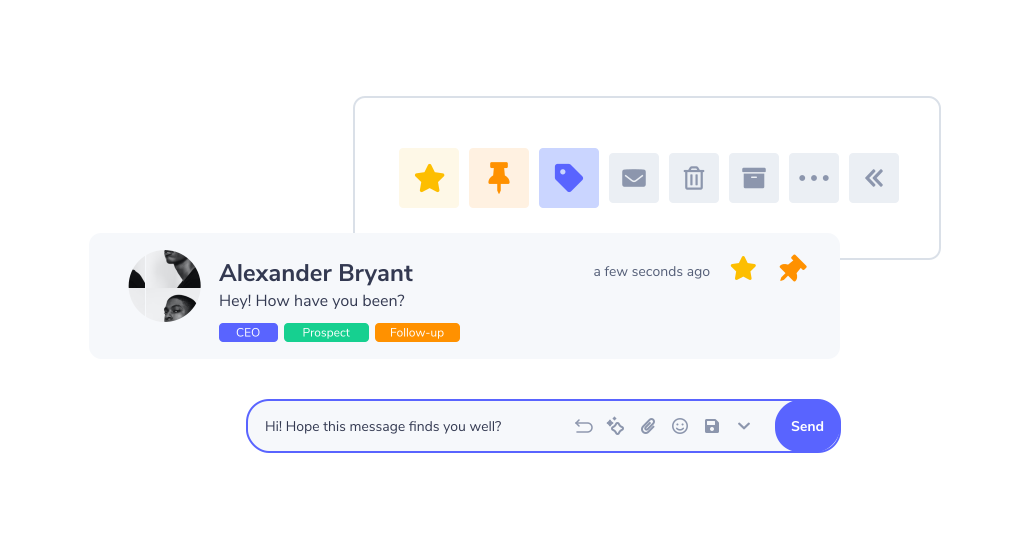
With LeadDelta, you can turn your inbox into a productivity powerhouse, helping you manage communications effortlessly.
How To Create Engaging LinkedIn Content
Content is the key to building a strong presence on LinkedIn.
Engaging LinkedIn content keeps your audience interested, helps you establish your authority and fosters connections.
Let’s explore how to create LinkedIn content that stands out.
Understand the Purpose of Your Content
Before you start creating a LinkedIn post, you need to understand why you’re creating content.
Is it to inform, inspire, or engage your audience?
Each purpose serves a unique role in building your LinkedIn presence.
- Define your goal – Identify what you want your content to achieve. Do you want to share your expertise, spark meaningful conversations, or motivate your network?
- Tailor your tone and message – Adjust your tone based on your target audience. For example, use a professional tone for industry peers or a conversational tone for broader engagement.
When your content has a clear purpose, it resonates better with your audience, increasing its impact.
Use Storytelling to Connect With Your Audience
People connect with stories, not just facts. By sharing experiences and adding a personal touch, you can make your content more relatable and memorable.
- Share personal experiences – Career milestone, a lesson learned, or a challenge overcome, your story can inspire others.
- Add a human element – Show your personality through anecdotes or reflections that let your audience see the real you.
You can either opt for video or text-based stories; the choice is yours. If you lack ideas to get things started, implement the AI story generator to generate persuasive stories tailored to the given prompt.
Storytelling makes your content more engaging and helps you build a stronger connection with your audience.
Types of LinkedIn Content
Understanding the types of content that perform well on LinkedIn will help you diversify your strategy and maximize engagement.
- Text posts – Short, insightful updates that encourage discussion. Share a quick tip, ask for opinions, or reflect on industry trends.
- Long-form articles explore topics in-depth, showcasing your expertise. Use them to share pure value and case studies.
- Visual content – Carousels, videos, and images grab attention and often receive higher engagement. Use visuals to simplify complex ideas or add a creative touch to your posts.
By mixing these content types, you can cater to a broader audience and keep your feed dynamic.
Plan and Schedule Your Content
Consistency is a must in staying visible on LinkedIn. Planning ahead ensures you always have valuable content ready to share.
- Create a content calendar – Plan your posts for the week or month to maintain consistency and variety.
- Use analytics tools – Track your content’s performance to see what resonates most with your audience. Refine your strategy based on metrics like impressions, clicks, and engagement rates.
Start using AuthoredUp to improve your content creation and analytics.
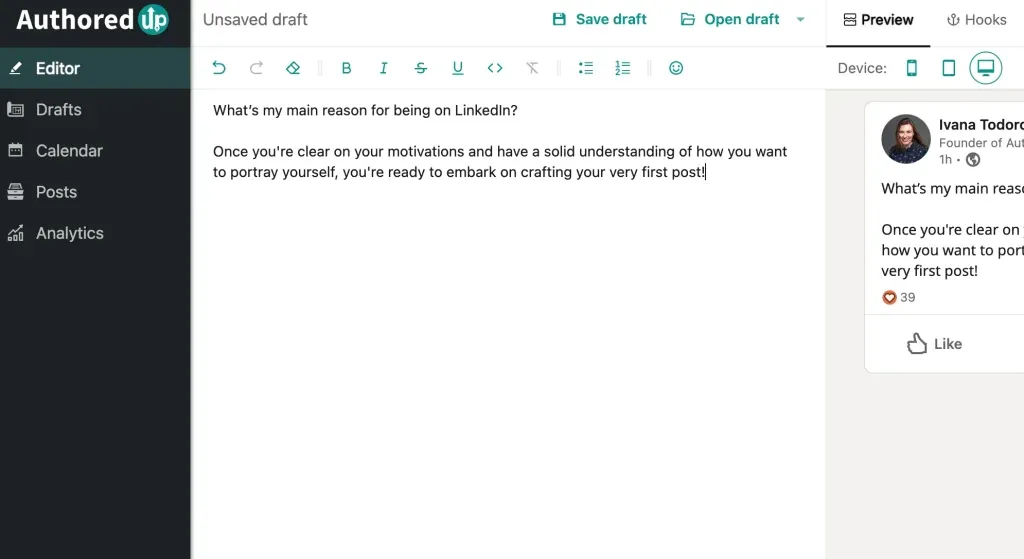
By planning ahead and leveraging the right tools, you can stay consistent, measure your progress, and continuously improve your content strategy.
LinkedIn Management Best Practices
Curate Your Feed for Strategic Insights
Your LinkedIn feed is your personal news hub. By curating it carefully, you can turn it into a tool for staying ahead in your industry.
- Unfollow irrelevant people – Keep your feed clean and focused by unfollowing connections who post unrelated or low-value updates.
- Engage with relevant connections – LinkedIn prioritizes posts you like and comment on.
- Engage eith niche communities – Participate in discussions on niche posts to position yourself as a leader within smaller, focused audiences. Be big fish in a small pound.
Leverage Data-Driven Networking
Build relationships informed by data.
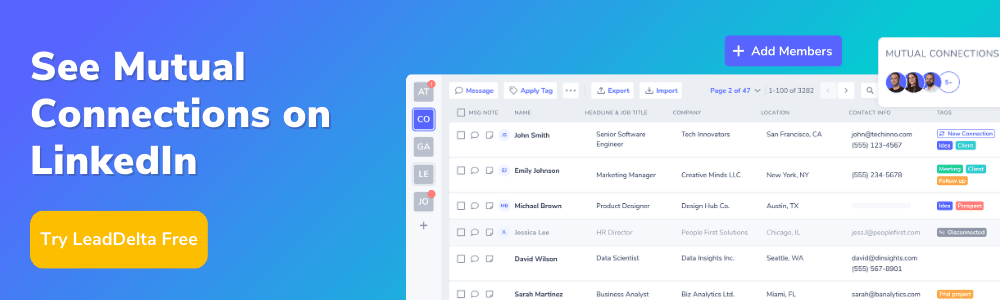
- Analyze Mutual Connections – Before reaching out, look at how you’re connected. Mentioning shared connections increases the likelihood of a positive response.
You can invite your team to join LeadDelta and effortlessly share connections, view mutual contacts, and collaborate.
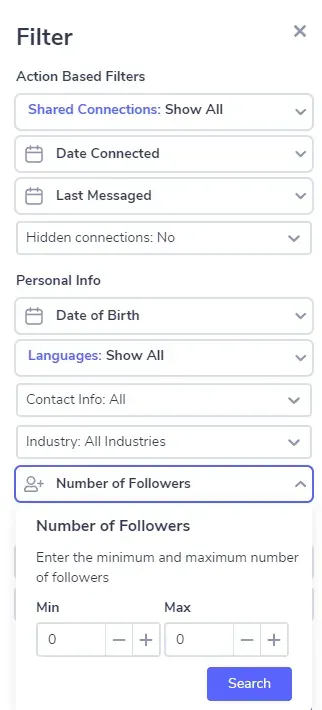
- Identify Hidden Influencers – Use LinkedIn’s analytics tools or external platforms to identify mid-level professionals driving change in their organizations. These often-overlooked individuals can be valuable allies.
With LeadDelta, you can filter your network by the number of followers your connections have.
- Time your engagement – Post and engage during times when your target audience is most active—weekdays between 9 AM and 11 AM tend to perform best.
Think Like a Publisher
Your LinkedIn content strategy should resemble a mini-publishing operation.
- Create evergreen content – Write posts that remain relevant long after publishing. These posts (e.g., ”5 timeless strategies for [topic]”) can attract engagement consistently over time.
- Host live events – Experiment with LinkedIn Live to run webinars, Q&As, or panel discussions. These events let you connect directly with your audience in real-time.
- Repurpose old posts – Don’t reinvent the wheel. Revisit your high-performing posts, update them, and re-share to maximize visibility and engagement.
Use LinkedIn for Research
LinkedIn is a goldmine for industry research.
- Monitor competitors – Keep tabs on how competitors position themselves, what they share, and how their audience responds.
- Use polls for insights – Run polls to gather data or opinions from your network. This engages with your audience and provides valuable insights you can act on.
- Study content trends – Observe what types of content (e.g., stories, how-tos, or case studies) resonate in your field and incorporate those trends into your own strategy.
Develop a Routine for Personal Growth
LinkedIn is a space for learning and growth.
- Reserve 15 minutes daily – Spend time engaging with posts, joining discussions, and commenting meaningfully. Consistency builds credibility over time.
- Build a ”Learning List” – Follow leaders and thought influencers in your field to stay informed about trends, challenges, and innovations.
- Create a weekly reflection post – At the end of each week, write a short LinkedIn post reflecting on a lesson you learned, a challenge you overcame, or an inspiring event you experienced. Consistent posts keep you visible and strengthen your professional brand.
By thinking outside the box and using these strategies, you’ll stand out on LinkedIn while continually growing your network and influence.
Conclusion
LinkedIn is a powerful platform for building your professional brand, expanding your network, and achieving your goals.
Effective management of your content, connections, and inbox ensures that every interaction and post works to your advantage.
Take actionable steps today to improve your workflow, strengthen relationships, and grow your influence on the platform.

